
Choosing the right platform is one of the most important decisions when planning a business website.
You may have heard that WordPress is powerful and flexible, while website builders are easier for beginners. Both options can be useful, but they are designed for different needs.
The right choice depends on your business goals, budget, technical requirements, SEO strategy, scalability, content needs and level of control.
Whether you need a small business website, portfolio website, corporate website or e-commerce website, understanding the differences between WordPress and website builders can help you make a more informed decision.
Key Takeaway: WordPress is generally the stronger choice for businesses that need flexibility, customization, SEO control and long-term scalability. Website builders can be suitable for simpler websites where ease of use and quick setup are the main priorities.
What Is WordPress?
WordPress is a content management system (CMS) that allows businesses and individuals to create and manage websites.
Unlike some hosted website builders, WordPress gives you significant control over your website’s structure, content, design, plugins and functionality.
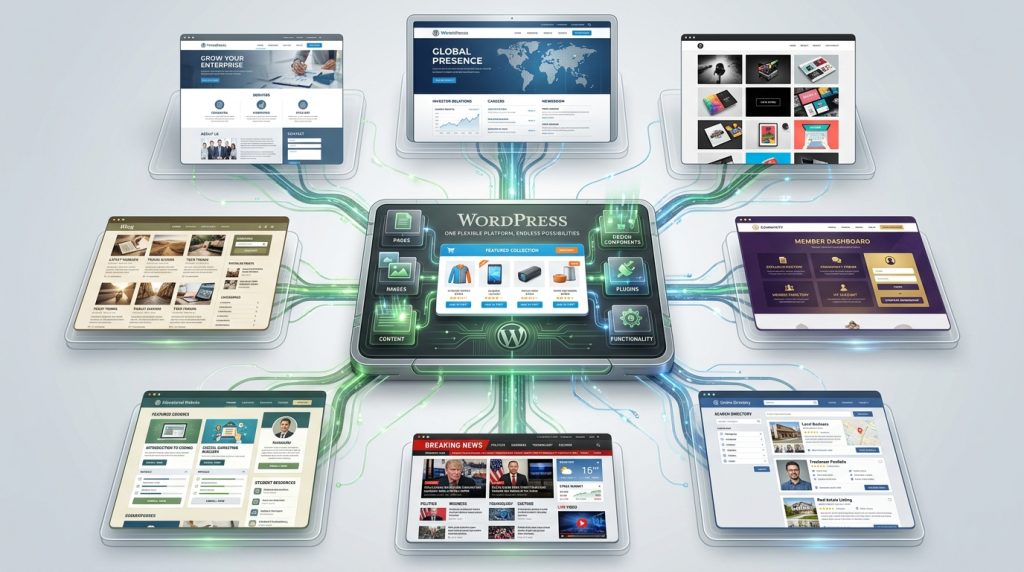
WordPress can be used to create:
- Business websites
- Corporate websites
- Portfolio websites
- Blogs
- E-commerce stores
- Membership websites
- Educational websites
- News websites
- Directories
- Custom web platforms
Its flexibility is one of the main reasons businesses and professionals choose it.
What Is a Website Builder?
A website builder is a platform that allows users to create websites using pre-built templates, visual editors and simplified tools.
Popular website builders include platforms such as:
- Wix
- Squarespace
- Shopify
- Webflow
- GoDaddy Website Builder
The exact features differ between platforms.
Generally, website builders are designed to reduce the technical knowledge required to create and manage a website.
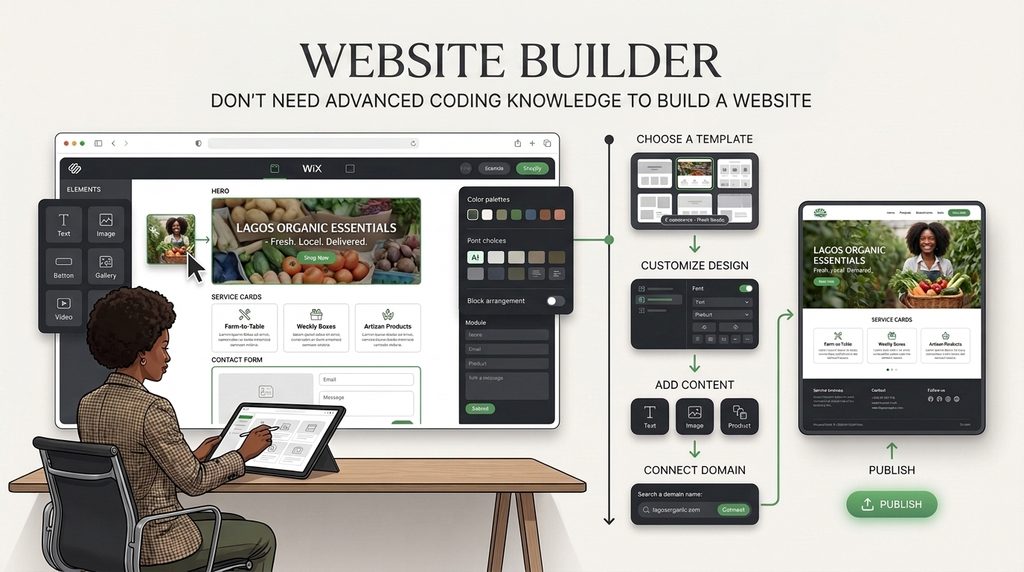
You can often:
- Choose a template
- Customize the design
- Add your content
- Connect your domain
- Publish the website
This makes website builders attractive to individuals and small businesses looking for a relatively straightforward way to get online.
WordPress vs Website Builders: At a Glance
| Factor | WordPress | Website Builders |
| Ease of setup | Moderate | Usually easier |
| Customization | Very high | Varies by platform |
| SEO control | High | Varies |
| Scalability | Excellent | Varies |
| Plugin ecosystem | Extensive | Usually more limited |
| Hosting flexibility | High | Usually platform-controlled |
| Maintenance | Requires management | Often handled by platform |
| E-commerce | Highly flexible | Depends on platform |
| Content publishing | Excellent | Good |
| Design flexibility | Very high | Usually template-driven |
| Technical control | High | Limited to platform capabilities |
| Long-term flexibility | Excellent | Depends on platform |
WordPress vs Website Builders: Which One Should You Choose?
There isn’t one answer that works for every business.
The better question is:
Which platform is better suited to what your business needs its website to accomplish?
Let’s compare the two options based on the factors that matter most.
1. Ease of Use
Website Builders
Ease of use is one of the biggest advantages of website builders.
Many provide visual drag-and-drop interfaces that allow users to make changes without writing code.
This can be useful if you want to:
- Change text
- Replace images
- Create basic pages
- Edit layouts
- Publish content
- Make simple updates yourself
WordPress
WordPress can also be relatively easy to manage, especially when configured with a user-friendly page builder or editor.
However, WordPress gives you more options, which also means there are more things to learn and manage.
You may need to understand:
- Themes
- Plugins
- Updates
- Hosting
- Backups
- Security
- Performance
Winner for simplicity: Website Builders
Winner for flexibility: WordPress
2. Design Flexibility
Your website design should reflect your brand rather than forcing your business into a generic template.
Website builders usually provide a selection of professionally designed templates.
This can be useful when you need a simple website quickly.
However, you may eventually encounter limitations when trying to customize specific aspects of the design.
WordPress provides considerably more flexibility.
You can use:
- Custom themes
- Page builders
- Custom CSS
- Custom development
- Specialized plugins
- Custom templates
This makes it possible to build a website around your business requirements rather than adapting your business to a template.
Winner for customization: WordPress
3. SEO
SEO is particularly important if you want your website to generate organic traffic from Google and other search engines.
Both WordPress and website builders can support SEO.
The difference is the level of control available.
With WordPress, you can have greater control over:
- Page structure
- URLs
- Metadata
- Headings
- Internal linking
- XML sitemaps
- Schema
- Content structure
- Redirects
- Performance
- Technical SEO
WordPress also has a large ecosystem of SEO tools and plugins.
However, simply using WordPress does not automatically make a website SEO-friendly.
SEO depends on how the website is structured, optimized and maintained.
Website builders have also improved their SEO capabilities significantly, but the level of technical control varies between platforms.
Winner for long-term SEO control: WordPress
4. Cost
Cost is more complicated than comparing the advertised monthly price of two platforms.
A website’s total cost can include:
- Domain
- Hosting
- Design
- Development
- Premium themes
- Plugins
- Apps
- Content
- SEO
- Maintenance
- Security
- Support
Website Builders
Many website builders operate on subscription-based pricing.
Your plan may include hosting, security and certain features.
This can make budgeting relatively straightforward.
WordPress
WordPress itself is open-source, but you will typically need to pay for hosting and potentially other services.
You may also invest in:
- Premium plugins
- Premium themes
- Professional development
- Maintenance
- Security
- SEO
Therefore, WordPress isn’t necessarily the cheapest option.
Its major advantage is that you have more control over where and how you spend your budget.
Winner for predictable simplicity: Website Builders
Winner for flexibility and control: WordPress
5. Scalability
A website that works for you today may not be sufficient in three or five years.
Your business might eventually need:
- More pages
- More products
- Multiple service categories
- Multiple locations
- Advanced forms
- Customer accounts
- Booking
- E-commerce
- Memberships
- Integrations
- Custom functionality
This is where WordPress becomes particularly attractive.
Because of its extensive ecosystem and development flexibility, WordPress can support relatively simple websites and much more complex digital platforms.
Some website builders can scale effectively too, particularly when using a platform designed for a specific business model.
However, you may eventually encounter platform-specific limitations.
Winner for broad scalability: WordPress
6. E-commerce
If your primary goal is selling products online, the decision becomes more specific.
WordPress can be transformed into a powerful e-commerce platform using solutions such as WooCommerce.
This provides significant flexibility over:
- Products
- Categories
- Payments
- Shipping
- Taxes
- Customer accounts
- Inventory
- Discounts
- Checkout
- Extensions
Dedicated e-commerce website builders can also be excellent choices.
For example, a business that wants to get an online store running quickly may prefer a specialized e-commerce platform.
The best choice depends on whether you prioritize simplicity or customization.
For maximum flexibility: WordPress
For simpler managed e-commerce: A dedicated e-commerce builder may be appropriate
7. Website Maintenance
This is one area where website builders often have an advantage.
With a hosted website builder, the platform provider generally manages much of the technical infrastructure.
You may not need to worry as much about:
- Server configuration
- Core platform updates
- Hosting infrastructure
- Some security responsibilities
WordPress gives you more control, but that control comes with responsibility.
A WordPress website may require:
- Plugin updates
- Theme updates
- WordPress core updates
- Backups
- Security monitoring
- Performance optimization
- Compatibility checks
This doesn’t mean WordPress is difficult to maintain.
It means you should have a maintenance plan.
Winner for lower technical maintenance: Website Builders
8. Security
Security is important regardless of which platform you choose.
Website builders handle much of the underlying infrastructure, which can reduce the amount of technical management required from the website owner.
With WordPress, security depends heavily on how the website is configured and maintained.
Good WordPress security practices include:
- Keeping WordPress updated
- Updating plugins and themes
- Using strong passwords
- Limiting administrator access
- Using secure hosting
- Maintaining backups
- Using HTTPS
- Monitoring for suspicious activity
The important point is that no platform automatically makes a website secure.
Good security practices still matter.
9. Content Marketing and Blogging
If your long-term strategy involves publishing educational content, SEO articles, guides and resources, WordPress is particularly strong.
It was originally developed around content publishing and has evolved into a broad content management platform.
You can create:
- Blog posts
- Categories
- Tags
- Author profiles
- Resources
- Landing pages
- Case studies
- Custom content structures
This makes WordPress a strong foundation for a business that wants to build a long-term content and SEO engine.
Website builders can also support blogging, but the available publishing and content-management capabilities vary.
Winner for content-heavy businesses: WordPress
10. Ownership and Control
This is an important consideration that businesses sometimes overlook.
With a hosted website builder, you are building your website within another company’s ecosystem.
The platform determines what functionality is available and how the system operates.
With WordPress, you generally have greater control over:
- Hosting
- Website files
- Database
- Themes
- Plugins
- Content
- Design
- Development
This can be particularly important for organizations expecting their website to become a long-term digital asset.
Which Is Better for Different Types of Businesses?
Small Business
A small business that simply needs a professional online presence may be well served by either option.
If the requirements are straightforward and ease of management is the priority, a website builder can work.
If the business expects to invest in SEO, content marketing, custom functionality or long-term growth, WordPress may be the better choice.
Startups
Startups should consider both their immediate needs and future direction.
A simple landing page may not require a complex website.
However, if the startup expects to build:
- Content
- SEO
- Lead generation
- Customer portals
- Integrations
- Product platforms
then choosing a flexible platform early can be beneficial.
Corporate Organizations
Corporate organizations often need more than a few pages.
They may require:
- Multiple departments
- Service pages
- Industry pages
- Leadership profiles
- Careers
- News
- Resources
- Case studies
- Forms
- Integrations
For these requirements, WordPress can provide the flexibility needed to build a structured corporate website.
Freelancers and Professionals
A freelancer, consultant or professional may only need a portfolio or professional website.
A website builder can be sufficient for a simple online profile.
However, WordPress can provide more room for growth if you eventually want:
- A blog
- SEO content
- Case studies
- Lead generation
- Booking
- Digital products
- Courses
- Memberships
E-commerce Businesses
For e-commerce businesses, the decision should be based on the complexity of the store.
A simple store may benefit from a managed e-commerce platform.
A business requiring extensive customization, integrations or unique workflows may benefit from WordPress and a flexible e-commerce solution.
WordPress vs Website Builders for SEO: Which Is Better?
If SEO is a major part of your customer acquisition strategy, platform choice deserves careful consideration.
WordPress provides extensive control over technical and on-page SEO.
However, a WordPress website does not rank simply because it uses WordPress.
Ranking depends on factors such as:
- Search intent
- Content quality
- Keyword targeting
- Website structure
- Internal linking
- Technical SEO
- Page experience
- Backlinks
- Competition
- Search relevance
A poorly optimized WordPress website can perform worse than a well-optimized website built with another platform.
The platform is the foundation—not the entire SEO strategy.
WordPress vs Website Builders: Which Is Better for Long-Term Business Growth?
Think about where you want your website to be in three to five years.
If your website is likely to remain relatively simple, a website builder may be enough.
But if you expect your website to become an important part of your marketing, sales and customer experience, flexibility becomes more valuable.
For example, you may eventually want to add:
Website → Blog → SEO → Lead Generation → CRM → E-commerce → Automation → Customer Portal
Choosing a platform capable of supporting that growth can reduce the need for major migration or redevelopment later.
When Should You Choose a Website Builder?
A website builder may be a good option if:
- You need a simple website
- You want to launch quickly
- You have limited technical knowledge
- You prefer managed hosting
- You don’t need extensive customization
- Your website requirements are unlikely to change significantly
- You want predictable platform management
For a simple project, the convenience can outweigh the limitations.
When Should You Choose WordPress?
WordPress may be the better choice if:
- SEO is important to your business
- You want significant design flexibility
- You plan to publish lots of content
- You need custom functionality
- Your business is expected to grow
- You need extensive integrations
- You want more control over your website
- You need a highly customized e-commerce website
- Your website is an important long-term business asset
WordPress vs Website Builders: A Simple Decision Framework
Ask yourself these questions:
1. Do I need a simple website or a scalable digital platform?
If simple, a website builder may be sufficient.
If scalable, consider WordPress.
2. How important is SEO to my customer acquisition strategy?
The more important organic search becomes, the more valuable technical control can be.
3. How much customization do I need?
The more customization you require, the more attractive WordPress becomes.
4. Who will manage the website?
If you want minimal technical responsibility, a managed website builder may be easier.
If you have a developer or agency supporting you, WordPress becomes easier to manage.
5. Will my website requirements change?
If you expect significant growth, consider scalability from the beginning.
Common Mistakes When Choosing a Website Platform
Choosing Based Only on Price
The cheapest platform today may not be the cheapest solution over the lifetime of your business.
Consider the total cost of ownership.
Choosing Based on Popularity
A platform being popular doesn’t automatically make it right for your business.
Your requirements should determine the choice.
Ignoring SEO
If you depend on Google to attract customers, SEO should influence your platform and website architecture decisions.
Choosing Too Many Features
You don’t need every feature available.
Build around actual business requirements.
Forgetting Future Growth
Think beyond the website you need today.
Ask what your business may need tomorrow.
Assuming WordPress Is Automatically Better
WordPress is powerful, but that doesn’t mean it is the right choice for every project.
The right platform depends on the project.
Frequently Asked Questions
Is WordPress better than a website builder?
WordPress is generally better for businesses that need flexibility, customization, SEO control and scalability. Website builders can be better for businesses that prioritize simplicity, speed and minimal technical maintenance.
Is WordPress good for small business websites?
Yes. WordPress can be an excellent choice for small businesses because it can start as a relatively simple website and expand as the business grows.
Is WordPress better for SEO?
WordPress provides extensive SEO control, but using WordPress does not automatically improve rankings. SEO performance depends on content, technical optimization, website structure, authority and many other factors.
Is it cheaper to use WordPress or a website builder?
There is no universal answer. Website builders often provide predictable subscription pricing, while WordPress costs can vary depending on hosting, design, plugins, development and maintenance.
Can a website builder rank on Google?
Yes. Websites created with website builders can rank in search engines. Rankings depend on the quality and relevance of the website and its SEO implementation, not simply the platform used.
Is WordPress difficult to maintain?
WordPress requires more maintenance than many fully managed website builders. However, updates, backups, security and technical maintenance can be handled by a web professional or maintenance service.
Which is better for an e-commerce website: WordPress or a website builder?
It depends on your requirements. A managed e-commerce platform can be convenient for straightforward stores, while WordPress can provide greater flexibility for businesses that need customization and complex integrations.
Should a startup use WordPress or a website builder?
A startup should choose based on its current requirements and growth plans. If the website is a simple marketing site, either option may work. If the startup expects significant content, SEO, integrations or custom functionality, WordPress may provide greater flexibility.
Can I switch from a website builder to WordPress later?
Yes, but migration can require rebuilding parts of the website, transferring content, setting redirects and reviewing SEO. If you expect significant growth, choosing a scalable platform from the beginning may reduce future migration work.
How do I choose the right website platform for my business?
Start with your business goals, audience, website type, budget, SEO strategy, functionality, technical requirements and future growth plans. Then choose the platform that best supports those requirements.
Final Thoughts
The WordPress vs website builder debate isn’t really about which platform is universally better.
It’s about which platform is better for your business.
If you need a simple website that can be launched quickly and requires minimal technical management, a website builder may be a practical choice.
If your website is going to become an important part of your marketing, SEO, lead generation, content strategy, e-commerce or long-term digital growth, WordPress offers a level of flexibility and control that can be difficult to match.
Before making your decision, think beyond:
“Which platform is easier?”
Ask:
“Which platform will best support where my business is going?”
That question will usually lead you toward a better long-term decision.
Need Help Choosing the Right Website Platform?
At Penetralia Hub, we don’t start with a platform and try to fit your business into it.
We start with your goals, audience, business model and future requirements.
Our Web Design, Web Development and Consultancy services can help you determine the right website structure, technology, functionality and digital strategy for your organization.
Whether you’re planning a business website, portfolio website, corporate website or e-commerce platform, the right decision starts with the right strategy.
Don’t just build a website. Build a digital asset that can grow with your business.