Getting your website onto Google is only the beginning.
Once search engines can discover your website, the next challenge is helping them understand what each page is about and making sure the page provides a useful experience for the people who visit it.
This is where on-page SEO comes in.
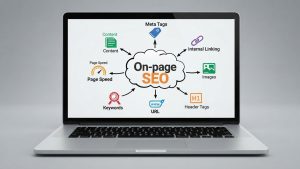
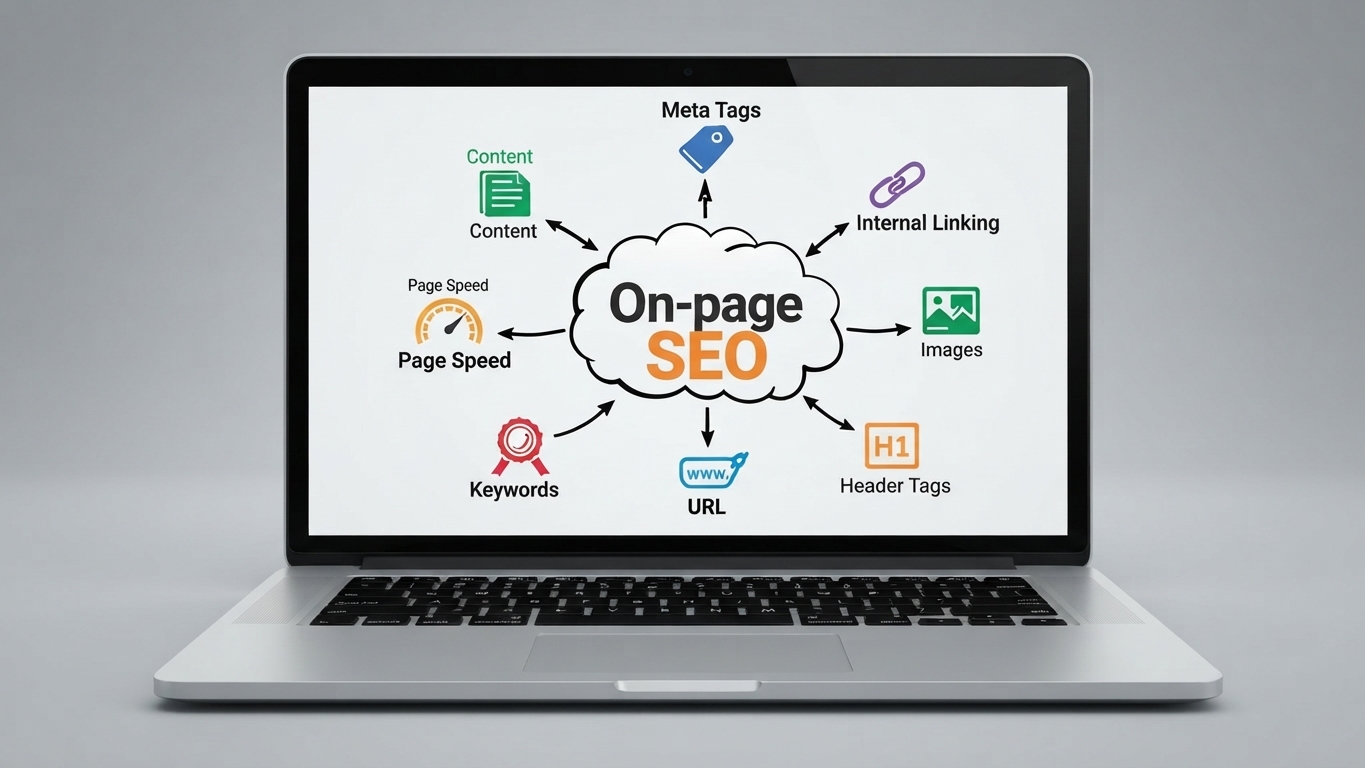
On-page SEO is the practice of optimizing the content and elements of individual web pages so that they are clearer, more useful, and better aligned with what people are searching for.
It includes things such as:
- Page titles
- Headings
- Website content
- Keywords and related terms
- URLs
- Meta descriptions
- Internal links
- Images and image descriptions
- Search intent
- Content structure
- User experience
For a small business, on-page SEO can make the difference between having a website that simply exists and having a website that can actually attract people through search.
The good news is that many on-page SEO improvements do not require advanced programming knowledge.
You can start with the pages you already have.
Key Takeaways
- On-page SEO focuses on optimizing individual pages on your website.
- It helps search engines understand your content and helps users find useful answers.
- Keywords are important, but modern on-page SEO is about much more than keyword placement.
- Search intent should guide the purpose and structure of every page.
- Page titles, headings, URLs, content, internal links, images, and metadata all matter.
- Every important page should have a clear purpose.
- Avoid keyword stuffing and writing primarily for search engines.
- On-page SEO works best as part of a broader SEO strategy that includes technical SEO, content, authority, and local visibility.
What Is On-Page SEO?
On-page SEO, sometimes called on-site SEO, refers to the optimization of elements on a webpage to help search engines understand its content and help users find and navigate useful information.
For example, suppose you run a web design company and have a page offering website design services.
Instead of simply creating a page titled:
Services
you could create a more descriptive page focused on:
Professional Website Design for Small Businesses
The page could then clearly explain:
- what you offer
- who the service is for
- the problems you solve
- your process
- what customers can expect
- relevant examples
- frequently asked questions
- how to contact you
This makes the page more useful to both visitors and search engines.
On-page SEO therefore isn’t about inserting keywords into random parts of a page.
It is about making the page clear, relevant, useful, and well structured.
On-Page SEO vs Off-Page SEO vs Technical SEO
SEO is a broad discipline, and it is useful to understand how its major components differ.
| SEO Type | Main Focus | Examples |
| On-page SEO | What is on your pages | Content, headings, titles, keywords, internal links |
| Technical SEO | How your website works | Crawlability, indexing, speed, mobile usability, structured data |
| Off-page SEO | Signals outside your website | Links, mentions, digital reputation |
| Local SEO | Visibility in specific locations | Google Business Profile, local relevance, reviews |
There is overlap between these areas.
For example, a page needs strong content and good technical foundations to perform well.
But when you’re specifically optimizing the content and elements on an individual page, you’re working primarily with on-page SEO.
Why Is On-Page SEO Important?
Imagine you publish an article about website costs.
The article is genuinely useful, but:
- the page title is vague
- headings are poorly structured
- the URL is confusing
- the content doesn’t clearly answer the searcher’s question
- there are no relevant internal links
- images have no useful descriptions
- the page doesn’t guide visitors toward the next step
You may have good information, but the page isn’t communicating its value effectively.
On-page SEO helps solve this problem.
1. It Helps Search Engines Understand Your Pages
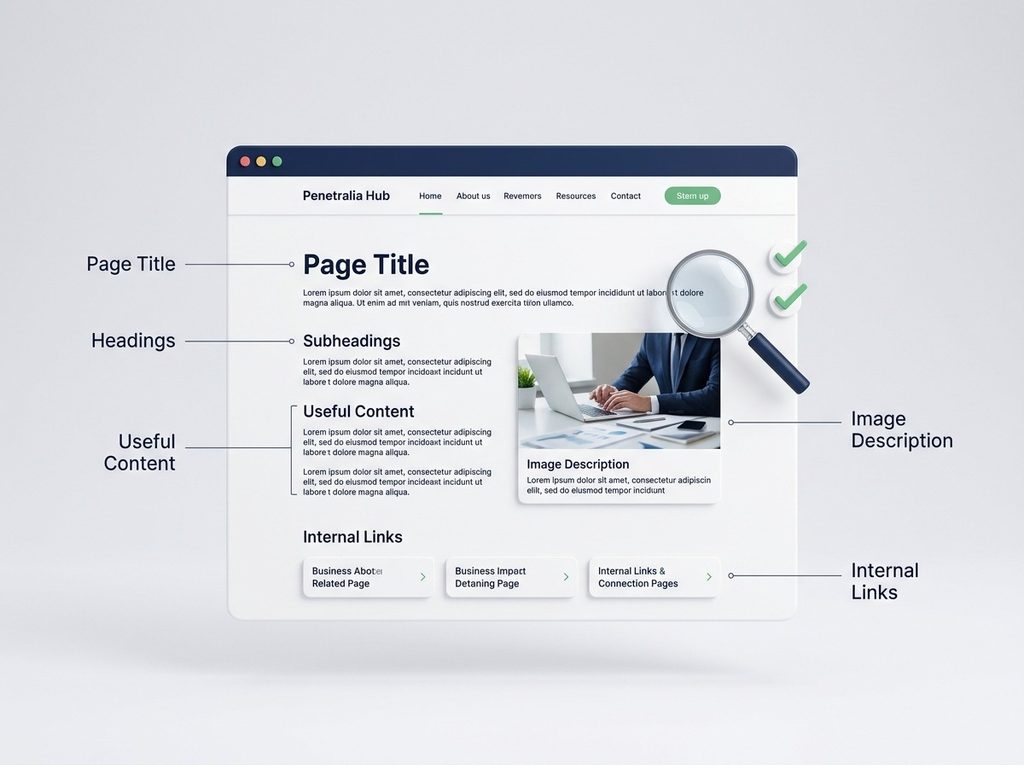
Search engines need to determine what a page is about.
Clear titles, headings, content, links, and page structure provide useful context.
For example:
/services
doesn’t communicate much by itself.
Compare it with:
/website-design-development
The second URL provides more information about the page’s subject.
2. It Helps Users Find What They Need
Good SEO should improve the visitor’s experience too.
A well-structured page makes it easier for someone to:
- scan the content
- find answers
- understand your service
- compare options
- navigate to related information
- take the next step
SEO and user experience should not be treated as opposing goals.
Good on-page SEO often improves both.
3. It Helps You Match Search Intent
Someone searching:
“what is WordPress?”
needs an educational explanation.
Someone searching:
“WordPress website designer”
may be looking for a professional.
Those searches require different types of pages.
Understanding search intent helps you decide whether a query should lead to:
- a blog article
- service page
- product page
- landing page
- comparison
- guide
- FAQ
This is one of the most important parts of on-page SEO.
Step 1: Identify the Primary Search Intent
Before optimizing a page, ask:
What does the person searching this phrase actually want?
There are several common types of search intent.
Informational Intent
The person wants information.
Examples:
- What is SEO?
- What is WordPress?
- How does Google Search work?
- What are long-tail keywords?
A blog article or guide is usually appropriate.
Commercial Investigation
The person is researching a solution before making a decision.
Examples:
- WordPress vs website builders
- how much does a website cost
- best website platform for small business
- social media management pricing
A comparison, guide, or detailed service-related article may be appropriate.
Transactional / Commercial Intent
The person is looking to take action.
Examples:
- website design company in Abuja
- SEO services for small business
- WordPress web designer
- social media management agency
A strong service or landing page may be appropriate.
Navigational Intent
The person is looking for a particular website, brand, or page.
For example:
Penetralia Hub
The goal here is generally to find the brand’s official online presence.
Step 2: Choose One Primary Keyword or Topic
Every important page should have a clear central topic.
For example:
Primary topic:
Local SEO for small businesses
Related terms might include:
- local SEO
- local search optimization
- Google Business Profile
- local search visibility
- small business SEO
- local rankings
The goal isn’t to repeat the main phrase constantly.
Instead, use the primary topic to establish what the page is about and cover closely related concepts naturally.
Step 3: Optimize the Page Title
The page title is one of the most important on-page elements.
For example:
Weak:
Services | Company Name
Better:
SEO Services for Small Businesses | Company Name
The second title communicates more clearly what the page is about.
A good title should generally:
- describe the page accurately
- reflect the primary topic
- be useful to searchers
- distinguish the page from others on your site
- avoid unnecessary repetition
Don’t write titles solely for search engines.
Write them so a potential visitor can immediately understand what the page offers.
Step 4: Create a Strong H1 Heading
The H1 is the main visible heading of the page.
For example:
SEO Services for Small Businesses
It should clearly communicate the primary subject of the page.
Your title tag and H1 can be similar, but they don’t have to be identical.
For example:
Title tag:
SEO Services for Small Businesses | Penetralia Hub
H1:
Build a Stronger Search Presence With Strategic SEO
The important thing is that the page’s purpose remains clear.
Step 5: Use H2 and H3 Headings to Structure Content
Large blocks of text are difficult to read.
Break your content into logical sections.
For example:
SEO Services for Small Businesses
What Is Small Business SEO?
Why Local Visibility Matters
How Search Engines Discover Your Business
Our SEO Services
Keyword Research
On-Page SEO
Local SEO
Why Choose Our Approach?
Frequently Asked Questions
This structure makes the content easier to scan and understand.
It also helps communicate the relationship between different sections of your content.
Step 6: Write for the Searcher’s Actual Question
This is where many businesses get SEO wrong.
They find a keyword and immediately start writing.
Instead, start with the problem behind the keyword.
Suppose the keyword is:
website cost
Don’t simply repeat “website cost” throughout the page.
Answer the questions a real person would have:
- How much does a website cost?
- Why do prices vary?
- What affects the price?
- What is included?
- What should I budget for?
- Are there recurring costs?
- How do I compare proposals?
- What should I ask a web designer?
This creates genuinely useful content.
Step 7: Make the Content Comprehensive—but Relevant
A page should contain enough information to satisfy the search intent.
That doesn’t mean every page needs to be thousands of words.
A simple contact page doesn’t need 3,000 words.
A comprehensive guide might.
The appropriate length depends on the purpose of the page.
Ask:
What does someone need to know to accomplish what they came here to do?
That question is more useful than asking:
“How many words does Google want?”
There is no universal word count that guarantees rankings.
Step 8: Use Keywords Naturally
Keywords still matter because they help establish topic relevance.
But avoid keyword stuffing.
For example, if you’re targeting:
website design for small businesses
you can naturally use variations such as:
- small business website design
- professional business websites
- website design services
- websites for small businesses
- business website development
The content should read naturally.
If a sentence sounds awkward because you’re trying to insert a keyword, rewrite it.
Step 9: Optimize Your URL
Your URL should be clear and descriptive.
Poor:
example.com/page?id=123
Better:
example.com/website-design/
For an article:
example.com/long-tail-keywords/
A good URL is generally:
- descriptive
- concise
- readable
- relevant to the page
- easy to understand
Avoid unnecessarily long URLs filled with every possible keyword variation.
Step 10: Write Useful Meta Descriptions
A meta description is the short description that may appear beneath a search result.
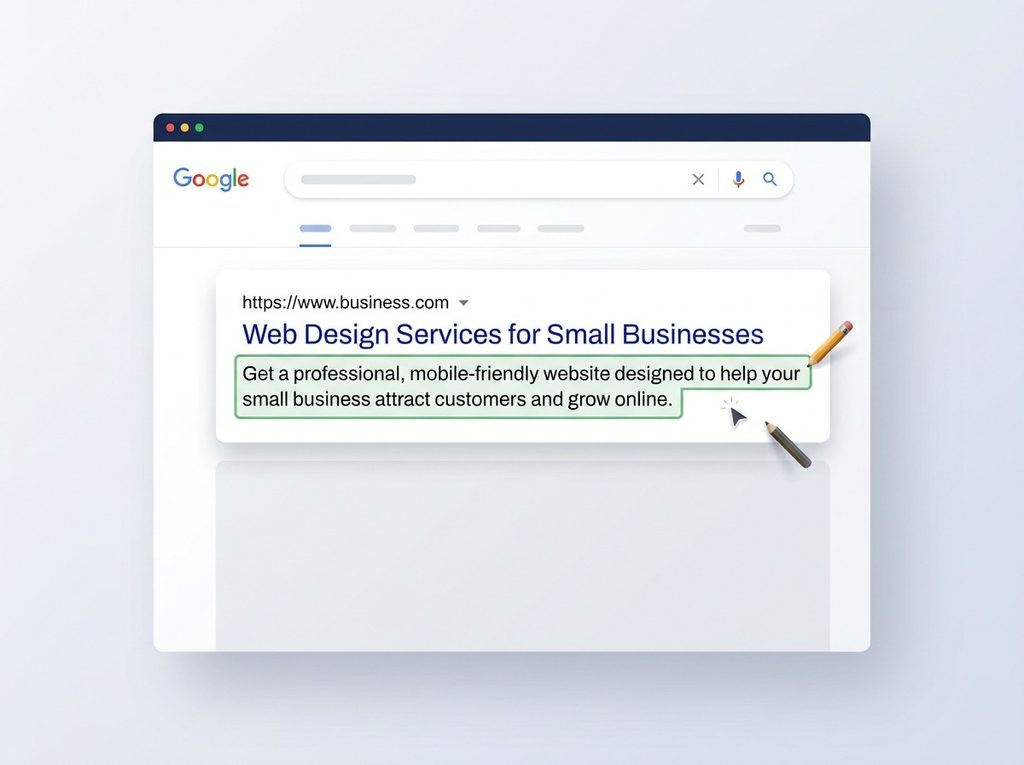
It doesn’t function as a simple ranking shortcut, but it can help communicate what the page offers and encourage relevant searchers to visit.
For example:
Learn what long-tail keywords are, how to find them, and how small businesses can use specific search terms to attract more relevant website traffic.
A useful meta description should:
- accurately describe the page
- communicate value
- naturally include relevant language
- encourage the right person to click
Don’t write a description that promises something the page doesn’t deliver.
Step 11: Optimize Images
Images are part of your website’s content and user experience.
Before uploading an image, consider:
- Is the image useful?
- Is it relevant to the page?
- Is the file unnecessarily large?
- Does the image have a meaningful filename?
- Does it need alternative text?
For example:
Poor filename:
IMG_48392.jpg
Better:
small-business-website-design.jpg
For meaningful images, alternative text should describe the image appropriately.
For example:
“Web designer reviewing a business website layout on a laptop”
Don’t stuff keywords into alt text simply for SEO.
Step 12: Use Internal Links
Internal links connect one page on your website to another page on the same website.
They help users discover related information and help search engines understand the relationship between pages.
For example, an article about on-page SEO could naturally link to:
- What Is SEO?
- How to Do Keyword Research
- Technical SEO Explained
- What Is Local SEO?
- Why Is My Website Not Showing on Google?
This creates a connected information structure.
Use Descriptive Anchor Text
Instead of:
Click here
use:
Learn how to do keyword research for your business website
The second option gives the visitor more context.
Step 13: Add Clear Calls to Action
SEO gets people to your website.
Your website still needs to tell them what to do next.
This is especially important for commercial pages.
A service page might end with:
Ready to improve your online presence?
followed by a clear button:
Talk to Our Team
Or:
Request a Website Consultation
Your call to action should match the page and the visitor’s stage in the buying journey.
A blog reader may not be ready to “Buy Now.”
They may be more comfortable with:
Explore Our Website Design Services
or:
Speak With a Digital Strategy Expert
Good on-page SEO and good conversion strategy should work together.
Step 14: Improve Page Readability
People don’t read websites the same way they read books.
They scan.
Make pages easier to scan with:
- short paragraphs
- descriptive headings
- bullet points
- numbered lists
- tables
- bold emphasis where appropriate
- whitespace
- clear navigation
Avoid walls of text.
A technically optimized page that nobody wants to read is not a successful page.
Step 15: Make the Page Mobile-Friendly
A large percentage of web traffic comes from mobile devices.
Your pages should therefore work properly on:
- smartphones
- tablets
- laptops
- desktop computers
Check:
- text size
- button size
- spacing
- menus
- images
- forms
- tables
- horizontal scrolling
- page layout
For WordPress and Elementor websites, responsive design should be considered throughout the design process—not added as an afterthought.
Step 16: Improve Page Speed
Page performance affects user experience and can contribute to search performance.
Large images, unnecessary scripts, excessive plugins, poor hosting configurations, and inefficient code can all contribute to slow pages.
Common improvements include:
- compressing images
- using appropriate image formats
- reducing unnecessary scripts
- limiting unnecessary plugins
- using caching
- improving hosting performance
- reducing page bloat
- keeping page builders and plugins updated
Performance optimization is partly technical SEO, but it directly affects the quality of the on-page experience.
Step 17: Check Your Content for Duplicate or Overlapping Intent
Imagine you have five articles:
- How Much Does a Website Cost?
- Website Design Pricing
- Website Design Cost Guide
- How Much Should a Business Website Cost?
- Business Website Pricing
If all five pages answer essentially the same question, they may compete with one another unnecessarily.
Before creating a new page, ask:
Do I already have a page that satisfies this search intent?
If yes, improve or expand the existing page instead of automatically creating another.
Step 18: Add Relevant FAQs
Frequently asked questions can help you address concerns that visitors commonly have.
For a website design service page, questions might include:
How much does a business website cost?
Explain the factors that influence pricing rather than giving an arbitrary number without context.
How long does it take to build a website?
Explain that timelines depend on scope, content readiness, functionality, revisions, and other factors.
Can you redesign my existing website?
Answer clearly and explain what a redesign may involve.
Do you provide SEO with website development?
Explain exactly what is included in your service.
FAQs are useful when they genuinely answer customer questions.
Don’t add questions solely because you want to include more keywords.
A Practical On-Page SEO Checklist
Before publishing a page, run through this checklist.
Search Intent
- Is the purpose of the page clear?
- Does it match the searcher’s intent?
- Does it answer the main question?
Content
- Is the information accurate and useful?
- Does it provide enough detail?
- Is the content original and relevant?
- Does it address common questions?
Keywords
- Is there a clear primary topic?
- Are related terms used naturally?
- Have you avoided keyword stuffing?
Structure
- Is there a clear H1?
- Are H2s and H3s logically organized?
- Are paragraphs easy to scan?
- Are lists or tables used where helpful?
Metadata
- Is the page title descriptive?
- Is the meta description useful?
- Is the URL clean and readable?
Links
- Are there relevant internal links?
- Do important pages link to one another?
- Are external links used where they add value?
Images
- Are images relevant?
- Are image files appropriately sized?
- Are meaningful images given useful alt text?
Conversion
- Is there a clear next step?
- Is the CTA relevant to the page?
- Can visitors easily contact the business?
Mobile & Performance
- Does the page work well on mobile?
- Are buttons easy to tap?
- Does the page load efficiently?
- Are there unnecessary elements slowing it down?
Example: Optimizing a Small Business Service Page
Let’s imagine a company offers website design.
A weak service page might look like this:
H1:
Website Design
Text:
We offer professional website design services. Contact us today for your website.
Button:
Submit
That’s not enough.
A stronger page could be structured like this:
H1:
Professional Website Design for Small Businesses
Introduction:
Explain the business problem and the outcome the service provides.
H2:
What Our Website Design Service Includes
Cover:
- strategy
- UX planning
- responsive design
- WordPress development
- content structure
- SEO foundations
- forms and integrations
- testing
H2:
Why Your Business Needs a Professional Website
Explain credibility, visibility, lead generation, customer information, and growth.
H2:
Our Website Design Process
- Discovery
- Planning
- Design
- Development
- Testing
- Launch
- Support
H2:
Frequently Asked Questions
Answer common customer concerns.
CTA:
Ready to build a website that supports your business goals?
Start a Website Project
Now the page isn’t simply “optimized for a keyword.”
It is optimized for a customer need.
Common On-Page SEO Mistakes
1. Keyword Stuffing
Repeating a keyword excessively can make content unreadable.
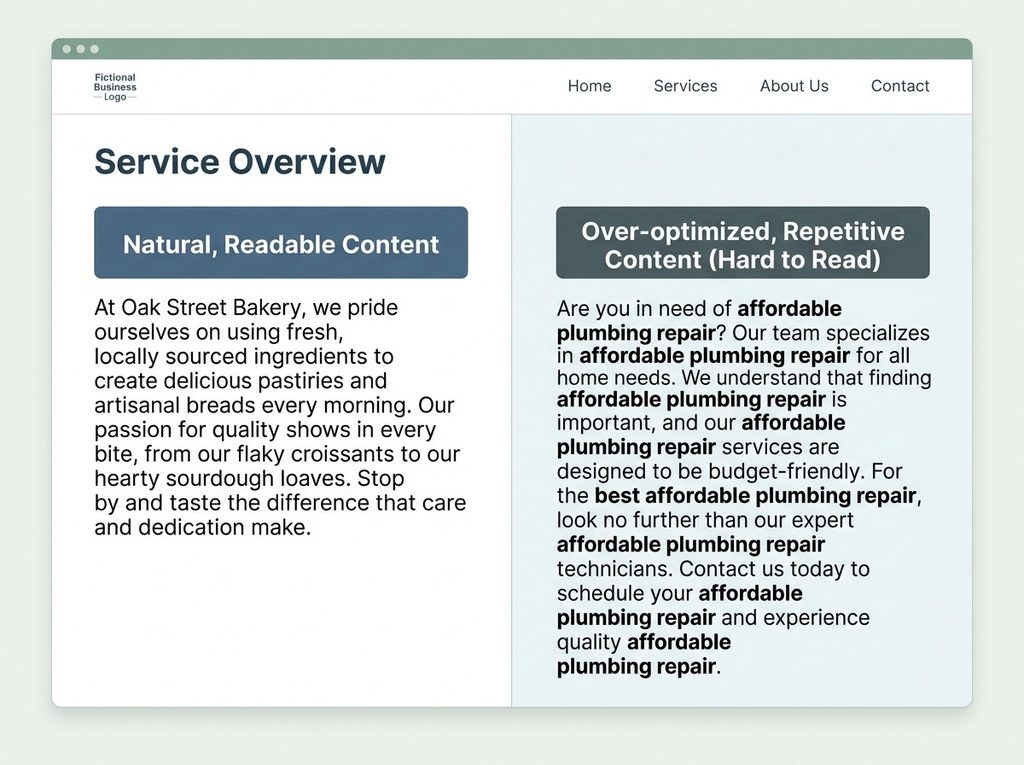
Use keywords naturally.
2. Writing for Search Engines Instead of People
A page should solve a problem, answer a question, or help someone make a decision.
Don’t sacrifice usefulness for SEO tactics.
3. Using Generic Page Titles
Titles such as:
Home
Services
About
Blog
are normal as navigation labels, but important pages should communicate what they actually offer.
4. Ignoring Search Intent
A page can target the correct keyword and still be the wrong type of result.
Always examine what users are actually looking for.
5. Creating Thin Service Pages
A service page that says:
“We provide excellent SEO services. Contact us.”
doesn’t give potential customers enough information.
Explain the service, process, benefits, scope, audience, and next steps.
6. Forgetting Internal Links
Every page shouldn’t exist in isolation.
Connect related content to create a logical website structure.
7. Using the Same Content on Multiple Pages
Creating multiple pages with nearly identical content can confuse both users and search engines.
Give each important page a distinct purpose.
8. Ignoring Conversion
Getting search traffic is not the final objective.
Visitors need a clear path toward:
- contacting you
- requesting a quote
- booking a consultation
- purchasing
- subscribing
- exploring another relevant page
SEO and conversion optimization should work together.
How On-Page SEO Fits Into a Complete SEO Strategy
On-page SEO is important, but it is only one part of SEO.
A strong search strategy can include:
Keyword Research
Understand what your audience searches for.
On-Page SEO
Optimize individual pages around useful topics and search intent.
Technical SEO
Make sure search engines can efficiently crawl, understand, and index your website.
Local SEO
Improve visibility for searches connected to your business location.
Content Strategy
Build useful resources around the topics your audience cares about.
Authority Building
Earn relevant recognition, mentions, and links that can strengthen your website’s authority.
These components support one another.
For example:
Keyword research identifies the opportunity.
↓
Content strategy determines what you should create.
↓
On-page SEO makes the page clear and useful.
↓
Technical SEO ensures the site can be effectively accessed and processed.
↓
Authority and local signals can strengthen visibility.
↓
Conversion optimization turns relevant visitors into opportunities.
This is why SEO should not be treated as simply “adding keywords to a website.”
When Should You Do On-Page SEO?
Ideally, on-page SEO should be considered before a page is created, not only after it has been published.
When planning a new page, determine:
- What is the purpose?
- Who is it for?
- What problem does it solve?
- What search intent does it target?
- What topic should it focus on?
- What related questions should it answer?
- What action should the visitor take afterward?
Then build the page around those answers.
For existing websites, conduct an audit of your important pages and identify opportunities to improve:
- titles
- headings
- content
- internal links
- URLs
- metadata
- images
- CTAs
- page structure
- search intent alignment
You don’t necessarily need to rebuild your entire website.
Sometimes a well-planned optimization of your existing pages can make a significant difference.
Build a Search-Friendly Website With Penetralia Hub
A website should not be designed only to look good.
It should help your business be discovered, understood, trusted, and contacted.
At Penetralia Hub, our Website Design & Development approach combines strategic planning, professional design, development, content structure, and digital growth considerations.
We can help businesses build websites with:
- clear page architecture
- responsive design
- SEO-friendly content structure
- strategic service pages
- clear calls to action
- internal linking opportunities
- WordPress development
- conversion-focused layouts
- performance-conscious implementation
- foundations for ongoing SEO
For businesses that already have a website, the solution may not always be a complete redesign.
Sometimes the better opportunity is to identify what’s preventing the existing website from performing effectively and optimize the right areas.
Your website should do more than represent your business online. It should support your business goals.
If you’re ready to build or improve a website with search visibility and growth in mind, Penetralia Hub can help you turn your website into a stronger digital business asset.
Frequently Asked Questions
What is on-page SEO in simple terms?
On-page SEO is the process of improving the content and elements of individual web pages so that search engines can better understand them and visitors can more easily find and use the information.
What are the most important on-page SEO factors?
Important areas include search intent, useful content, page titles, headings, URLs, internal links, relevant keywords, image optimization, page structure, mobile usability, and clear user experience.
Is on-page SEO the same as SEO?
No. On-page SEO is one component of SEO. A complete SEO strategy can also include technical SEO, off-page SEO, local SEO, content strategy, and other activities.
How often should I update my on-page SEO?
There is no universal schedule. Review important pages when your business changes, your services change, the information becomes outdated, or search performance indicates an opportunity for improvement.
Do I need keywords for on-page SEO?
Keywords and search topics remain useful because they help you understand what people are looking for. However, effective on-page SEO is about satisfying the searcher’s need rather than repeatedly inserting exact keywords.
Does on-page SEO guarantee Google rankings?
No. On-page optimization can improve relevance, clarity, and usability, but rankings depend on many factors, including competition, technical accessibility, content quality, authority, search intent, and other signals.
Should I optimize old blog posts?
Yes. Updating existing content can be a valuable SEO activity, particularly when an article is outdated, losing traffic, targeting an opportunity you now understand better, or missing important information.
Is on-page SEO important for small businesses?
Yes. Small businesses can benefit from clearly structured, relevant pages that target the searches most closely connected to their products, services, audience, and locations.
Can I do on-page SEO myself?
Yes. Many basic tasks—such as improving headings, page titles, URLs, internal links, content structure, and calls to action—can be done without advanced technical skills. More complex websites may benefit from professional SEO and web development support.
Final Thoughts
On-page SEO is ultimately about communication.
Your website needs to communicate clearly with two audiences at the same time:
Search engines:
“This page is clearly about this topic and provides relevant information.”
Visitors:
“This page understands what I need and gives me a useful next step.”
When those two objectives work together, SEO becomes much more effective.
Start with search intent.
Choose a clear topic.
Create genuinely useful content.
Structure the page properly.
Optimize your titles, headings, URLs, images, and links.
Make the experience easy to use.
Then give visitors a clear path forward.
Don’t treat on-page SEO as a collection of tricks to make Google rank your website.
Treat it as a way to make your website clearer, more useful, and more valuable to the people you’re trying to reach.
That is the foundation of sustainable search visibility.