You can have a beautiful website, publish useful content, and target the right keywords but if search engines cannot properly access, understand, or index your website, your SEO efforts can still struggle.
This is where technical SEO comes in.
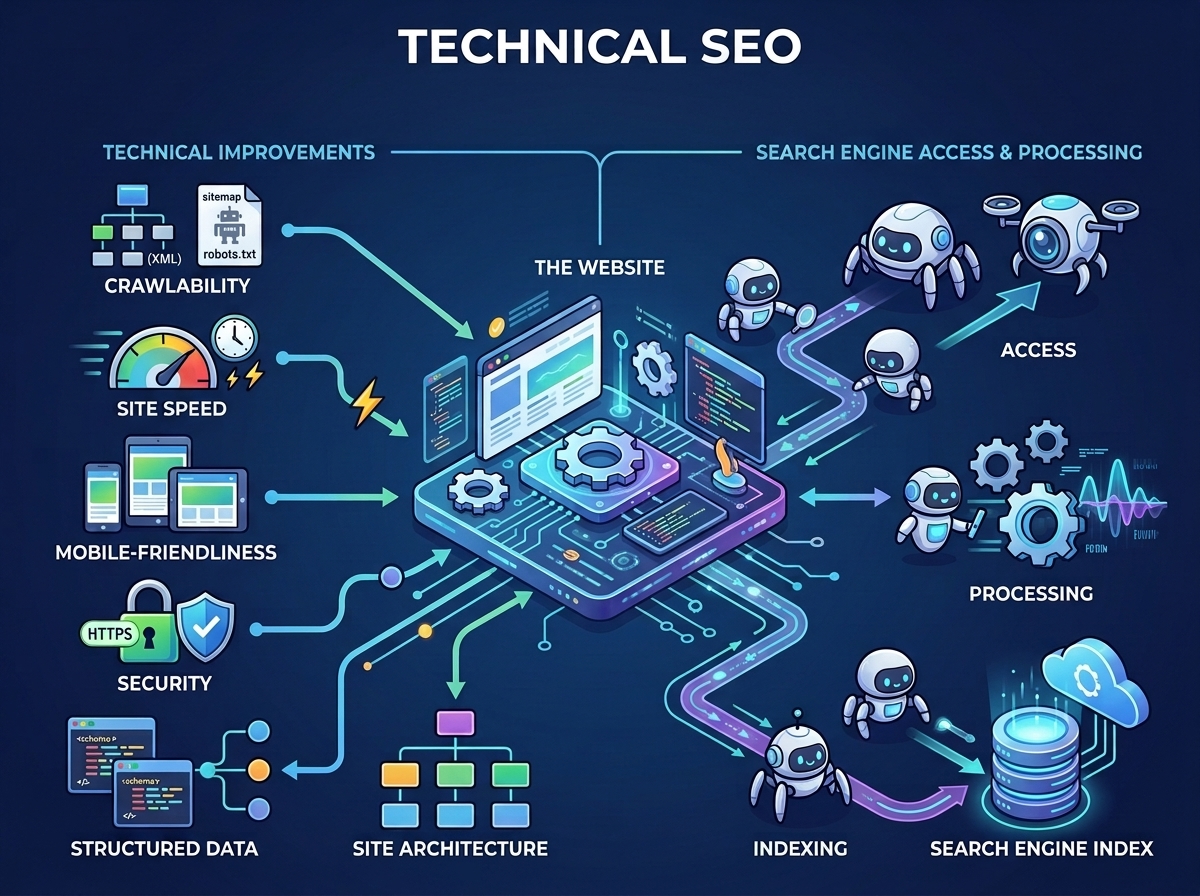
Technical SEO is the process of improving the technical foundation of a website so that search engines can efficiently crawl, understand, and index its pages, while also providing a good experience for visitors.
The word “technical” can make SEO sound complicated.
But technical SEO does not always require you to be a programmer.
As a business owner, understanding the basics can help you identify problems that may prevent your website from performing well in search.
Some technical SEO issues are simple, such as:
- Broken links
- Incorrect redirects
- Missing or incorrect sitemap information
- Pages accidentally blocked from search engines
- Poor mobile usability
- Slow-loading pages
- Duplicate or confusing URLs
Others may require a web developer or SEO professional to diagnose and fix.
The important thing is knowing what to look for and why it matters.
Key Takeaways
- Technical SEO focuses on the technical foundation of your website.
- It helps search engines crawl, understand, and index your content.
- A technically strong website makes your other SEO efforts more effective.
- Important areas include crawling, indexing, site structure, mobile usability, performance, redirects, canonical URLs, HTTPS, structured data, and broken links.
- Not every technical SEO issue requires advanced coding knowledge.
- Technical SEO is different from on-page SEO, although the two work together.
- Fixing technical problems does not automatically guarantee higher rankings.
- Regular technical checks can help prevent small website problems from becoming major search visibility issues.
What Is Technical SEO?
Technical SEO refers to improvements made to the technical aspects of a website that help search engines access and process the site effectively.
Think of your website as a physical building.
Your content is what is inside the building.
Your design determines how the building looks and how people move around it.
Technical SEO is partly about making sure the building has:
- working entrances
- clear pathways
- functioning doors
- proper signs
- accessible rooms
- a reliable structure
If visitors cannot enter the building or find important rooms, the quality of what is inside becomes less useful.
The same principle applies to websites.
A website can contain excellent information, but technical problems can make it difficult for search engines or users to access that information.
Why Is Technical SEO Important?
Search engines need to discover your pages, access them, understand them, and decide whether they should be included in search results.
Technical SEO supports this process.
For example, imagine a business publishes 100 valuable pages.
But 20 important pages are accidentally blocked from crawling.
Another 15 have broken links.
Several pages load very slowly.
Some pages have confusing duplicate URLs.
The website may have excellent content, but the technical foundation is creating unnecessary problems.
Technical SEO helps reduce these barriers.
It can also improve the experience for visitors.
A fast, secure, mobile-friendly, well-structured website is generally easier for people to use.
How Search Engines Interact With Your Website
Before discussing specific technical SEO tasks, it helps to understand three basic concepts:
Crawling
Search engine crawlers discover and access pages.
Indexing
Search engines process and store information about pages they are eligible to include in their search index.
Ranking
When someone searches, search engines determine which relevant results to display and in what order.
Technical SEO primarily supports the first two stages, although technical quality can also affect the overall search experience.
A simple way to visualize the process is:

Technical SEO vs On-Page SEO
These two areas are closely connected, but they are not the same.
| On-Page SEO | Technical SEO |
| Content | Crawling |
| Headings | Indexing |
| Keywords | Site architecture |
| Page titles | Redirects |
| Internal links | HTTPS |
| Meta descriptions | XML sitemaps |
| Search intent | Canonical URLs |
| Content structure | Performance |
| Image optimization | Mobile usability |
For example:
If you write an excellent article about local SEO, on-page SEO helps you structure and optimize that article.
But if your website accidentally tells search engines not to index the page, that’s a technical SEO problem.
You need both.
1. Make Sure Search Engines Can Crawl Your Website
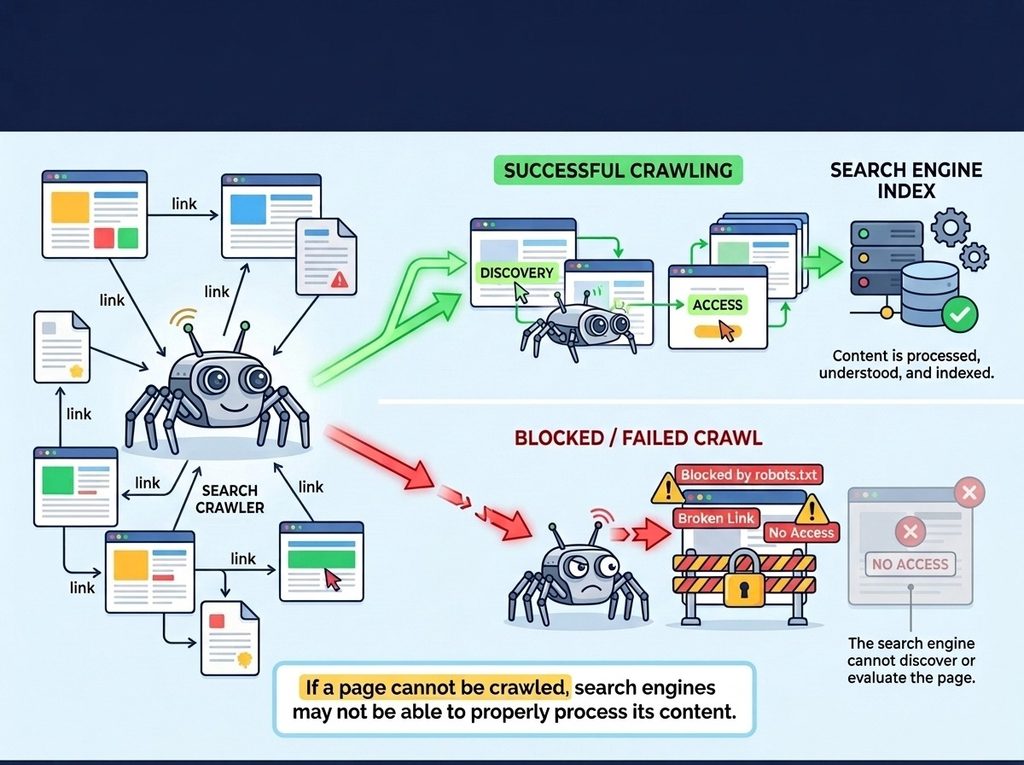
Crawling is the process through which search engine crawlers discover and access pages.
If a page cannot be crawled, search engines may not be able to properly process its content.
One important file involved in crawling is your robots.txt file.
A robots.txt file provides instructions about which areas of a website crawlers may access.
However, robots.txt should be handled carefully.
An incorrect rule can unintentionally prevent crawlers from accessing important resources or pages.
For example, a poorly configured robots.txt file could block an important section of your website.
What Should You Do?
Check that important parts of your website are not accidentally blocked.
If you’re unsure about your robots.txt configuration, ask a developer or SEO professional to review it rather than changing it randomly.
2. Check Which Pages Are Indexed
Crawling and indexing are not the same thing.
A search engine can crawl a page without necessarily including it in its index.
For important business pages, you want to understand whether they are eligible to appear in search.
You can use tools such as Google Search Console to investigate indexing issues.
Look for important pages such as:
- Homepage
- Service pages
- Product pages
- Location pages
- Important blog articles
- Contact or conversion pages where appropriate
If an important page isn’t indexed, investigate why.
Possible reasons can include:
- accidental noindex instructions
- crawling problems
- duplicate content
- canonicalization issues
- poor-quality or incomplete pages
- technical errors
- the page being very new
Don’t assume that every page on your website must be indexed.
Some pages—such as certain administrative or utility pages—may intentionally be excluded.
The goal is to make sure important pages are correctly handled.
3. Understand the noindex Directive
A noindex directive tells search engines that a page should not be included in their search index.
This can be useful when intentional.
For example, you may not want certain utility pages appearing in search results.
But it becomes a problem when an important page is accidentally marked noindex.
Imagine your main service page contains:
SEO Services
but its settings tell search engines:
Do not index this page.
You could spend months improving the page without realizing that it has been deliberately excluded from the index.
What Should You Do?
Check important pages for unintended noindex settings.
On WordPress websites, SEO plugins and other settings can influence indexability.
If you’re not comfortable checking these settings yourself, have your developer review them.
4. Create and Maintain an XML Sitemap
An XML sitemap is a file that helps search engines discover important URLs on your website.
For a simple website, it may contain URLs such as:
- homepage
- services
- about
- contact
- blog articles
- important category or location pages
A sitemap doesn’t guarantee that every listed page will be indexed.
Instead, it provides search engines with information about URLs you consider important.
For many modern websites, sitemap generation is handled automatically by a CMS or SEO tool.
Best Practice
Make sure your sitemap:
- exists
- is accessible
- contains the URLs you actually want discovered
- does not contain large numbers of broken or irrelevant URLs
- is updated appropriately as your site changes
You can also submit your sitemap through Google Search Console.
5. Build a Logical Website Structure
Your website structure matters for both users and search engines.
Imagine a business website with these pages:

This structure is easy to understand.
Now imagine a website where important pages are buried several clicks deep, while unrelated pages are randomly connected.
That creates unnecessary complexity.
A good website architecture should make it easy to understand:
- what your business offers
- which pages are most important
- how pages relate to each other
- how visitors move through the site
This is one reason website planning should happen before development.
6. Use Internal Links Properly
Internal links connect pages within your own website.
They help visitors move between related topics and can help search engines discover and understand relationships between pages.
For example, a blog article about:
What Are Long-Tail Keywords?
could link to:
How to Do Keyword Research for a Business Website
That article could then link to:
On-Page SEO: What It Is and How to Do It
This creates a connected content ecosystem.
Internal linking is especially useful when you have several pages covering related topics.
Avoid Orphan Pages
An orphan page is a page that has no meaningful internal links pointing to it.
If an important page is isolated from the rest of your website, both users and crawlers may have a harder time discovering it.
Make sure important pages are connected naturally through your site’s navigation and content.
7. Fix Broken Links
A broken link leads to a page that no longer exists or cannot be accessed properly.
For example:
yourwebsite.com/website-design
may have existed previously but later been deleted.
Another page still links to it.
Visitors click the link and encounter an error.
Too many broken links can create a poor user experience and make website maintenance more difficult.
Regularly check for:
- broken internal links
- outdated URLs
- links to deleted pages
- incorrect redirects
- broken external references
When appropriate, update the link to the correct destination.
8. Handle Redirects Correctly
A redirect sends visitors and search engines from one URL to another.
For example:
oldwebsite.com/services
could redirect to:
oldwebsite.com/web-design-services
A 301 redirect is commonly used when a page has permanently moved.
Redirects are especially important when:
- redesigning a website
- changing URLs
- moving from one domain to another
- restructuring website pages
- deleting outdated content
- migrating websites
Without proper redirects, old URLs may produce errors and users can lose access to useful content.
Don’t Create Redirect Chains
A redirect chain might look like:
Page A → Page B → Page C → Page D
Where possible, redirect Page A directly to the final relevant page.
This keeps the path simpler.
9. Use HTTPS
HTTPS helps secure communication between a website and its visitors.
You’ll usually recognize a secure HTTPS website by an address beginning with:
https://
rather than:
http://
HTTPS is important for modern websites, particularly when visitors submit:
- contact forms
- login information
- payment information
- personal information
Most professional websites should be using HTTPS.
If your website still has HTTP pages or certificate problems, have the configuration checked.
10. Make Your Website Mobile-Friendly
A website that looks excellent on a desktop but breaks on a smartphone is not providing a good modern web experience.
Check your website on actual mobile devices.
Look at:
- text size
- navigation
- buttons
- forms
- images
- spacing
- menus
- tables
- page width
- horizontal scrolling
A user should not have to zoom in and out just to read your content.
For WordPress and Elementor websites, responsive settings should be reviewed at different screen sizes before publishing.
11. Improve Website Performance
Website speed is both a user experience concern and an important part of technical website quality.
A slow website can frustrate visitors.
Common causes include:
- oversized images
- excessive plugins
- poorly optimized code
- unnecessary scripts
- slow hosting
- inefficient databases
- excessive third-party tools
- poorly configured caching
Practical Improvements
Start with simple actions:
- compress large images
- remove unnecessary plugins
- use efficient hosting
- enable appropriate caching
- optimize media
- reduce unnecessary scripts
- keep software updated
- avoid adding unnecessary visual effects
Performance optimization should be approached carefully.
Removing something simply because it “looks technical” isn’t necessarily an improvement.
Focus on measurable problems.
12. Check Core Web Vitals
Core Web Vitals are metrics used to assess aspects of page experience, particularly around loading performance, responsiveness, and visual stability.
ymknv
,b.n
They include measurements such as:
- Largest Contentful Paint (LCP) — relates to loading performance
- Interaction to Next Paint (INP) — relates to responsiveness
- Cumulative Layout Shift (CLS) — relates to visual stability
You don’t need to memorize the technical definitions to understand the basic principle:
A good website should load efficiently, respond properly, and avoid unexpected layout movement.
If your website has poor performance measurements, investigate the underlying causes rather than simply trying to “pass a score.”
13. Avoid Duplicate URL Problems
Sometimes the same or very similar content can be accessible through multiple URLs.
For example:
example.com/service
and
example.com/service/
may be treated differently depending on how the website is configured.
Other duplication can occur through:
- URL parameters
- HTTP and HTTPS versions
- www and non-www versions
- multiple category paths
- printer-friendly versions
- filtered URLs
A properly configured website should establish consistent URL handling.
14. Understand Canonical URLs
A canonical URL tells search engines which URL should be treated as the preferred version when multiple URLs contain the same or substantially similar content.
For example, suppose the same product can be accessed through several URLs because of filtering or tracking parameters.
A canonical URL can help communicate which version should be considered the main page.
Canonicalization is particularly useful on larger websites with:
- e-commerce filters
- multiple URL parameters
- syndicated content
- complex site structures
- similar pages
But canonical tags should not be used as a substitute for fixing obvious website architecture problems.
15. Use Structured Data Where Appropriate
Structured data is a standardized way of providing search engines with additional information about a page.
It can help search engines understand things such as:
- products
- organizations
- events
- articles
- breadcrumbs
- local businesses
- frequently asked questions in supported contexts
Structured data doesn’t mean you should add every possible schema type to every page.
Use markup that accurately describes the content.
For example, if your website represents a local business, appropriate business-related structured data may help search engines understand information about that organization.
16. Create a Clean URL Structure
A good URL should be understandable.
For example:
Better:
penetraliahub.com/long-tail-keywords/
Less useful:
penetraliahub.com/page?id=8493
Descriptive URLs can help users understand what they are about to visit.
Keep URLs:
- concise
- readable
- descriptive
- relevant
Avoid changing URLs unnecessarily.
Every URL change can create additional migration and redirect considerations.
17. Check Your 404 Pages
A 404 error generally means that a requested page cannot be found.
404 pages are not automatically a disaster.
Pages sometimes need to be removed.
The problem occurs when important or frequently visited URLs unexpectedly return 404 errors.
For example:
Your main service page used to be:
/web-design/
You redesigned the site and changed it to:
/website-design/
But you forgot to redirect the old URL.
Visitors who follow an old link now receive an error.
For important deleted or moved pages, determine whether a relevant redirect should be implemented.
18. Keep WordPress and Plugins Updated
If your website runs on WordPress, the CMS, themes, and plugins form part of its technical foundation.
Outdated software can create:
- security vulnerabilities
- compatibility problems
- bugs
- broken functionality
- performance issues
Updates should be handled carefully.
Don’t blindly update everything on a live business website without considering compatibility and backups.
A proper maintenance process should include:
- Backup
- Update
- Test
- Check important pages
- Check forms
- Check mobile layouts
- Check critical functionality
Technical SEO and website maintenance often overlap.
19. Make Important Pages Easy to Discover
Not every page on your website has equal importance.
Your primary pages should be easy to reach.
For a typical service business, these might include:
- Home
- About
- Services
- Individual service pages
- Contact
- Key resources
- Important case studies
Don’t bury your most valuable pages deep inside the website.
Your navigation should reflect your business priorities.
20. Monitor Your Website After Major Changes
Technical SEO problems frequently appear after website changes.
Be especially careful after:
- redesigns
- domain changes
- migrations
- URL restructuring
- plugin changes
- theme changes
- hosting changes
- HTTPS implementation
- major content removals
A website can look perfectly normal to you while important search functionality has been affected behind the scenes.
After major changes, check:
- indexability
- redirects
- sitemap
- robots.txt
- important URLs
- internal links
- forms
- mobile experience
- page performance
A Simple Technical SEO Audit for Beginners
You don’t need to become a technical SEO expert to perform a basic health check.
Start with these questions.
Crawling
- Can search engines access important pages?
- Is robots.txt configured correctly?
Indexing
- Are important pages eligible for indexing?
- Are important pages actually appearing in search?
Sitemap
- Does the website have an XML sitemap?
- Is it accessible and reasonably clean?
Site Structure
- Are important pages easy to reach?
- Are related pages connected?
Links
- Are there broken internal links?
- Are important pages orphaned?
URLs
- Are URLs clear and consistent?
- Have changed URLs been redirected?
Mobile
- Does the website work properly on smartphones?
Performance
- Are important pages loading efficiently?
- Are large images or unnecessary scripts slowing them down?
Security
- Is the site using HTTPS?
- Are WordPress, themes, and plugins maintained?
Errors
- Are important pages returning 404 or server errors?
- Are redirects working correctly?
This basic checklist can reveal many common problems.
Technical SEO Tools You Can Use
Several tools can help you investigate technical SEO.
Google Search Console
Google Search Console can help website owners understand how Google discovers and processes their website, including search performance and indexing-related information.
It should be one of the first tools a business owner learns to use.
Google PageSpeed Insights
This can help you investigate page performance and user experience metrics.
Google Rich Results Test
Useful when checking whether eligible structured data is being interpreted correctly for supported rich-result features.
Browser Developer Tools
Modern browsers include developer tools that can help developers inspect:
- page errors
- network requests
- performance
- HTML
- CSS
- JavaScript
These are more technical but valuable when diagnosing problems.
Technical SEO for a WordPress Website
WordPress makes it possible to build powerful websites without writing every line of code yourself.
But WordPress websites can still develop technical SEO problems.
Common causes include:
- poorly configured SEO settings
- excessive plugins
- outdated plugins
- duplicate pages
- incorrect redirects
- accidental noindex settings
- slow themes
- large media files
- poor hosting
- broken internal links
If you’re using Elementor or another page builder, also check that responsive layouts and page performance remain healthy as the site grows.
A professional WordPress setup should consider SEO from the beginning rather than attempting to repair everything after the website is finished.
Technical SEO During a Website Redesign
A website redesign is one of the most important times to think about technical SEO.
A redesign can change:
- URLs
- page structure
- navigation
- content
- internal links
- metadata
- images
- scripts
- hosting
- themes
- plugins
If these changes aren’t managed properly, search visibility can be affected.
Before Launch
Create a list of important existing URLs.
During Development
Build the new structure carefully.
Before Going Live
Check:
- redirects
- indexability
- sitemap
- robots.txt
- mobile usability
- internal links
- page performance
- important metadata
After Launch
Monitor the website for:
- indexing problems
- traffic changes
- broken URLs
- server errors
- unexpected ranking changes
A redesign should improve the website—not accidentally erase years of accumulated search visibility.
Common Technical SEO Mistakes
Mistake 1: Blocking Important Pages
An incorrect robots.txt or noindex setting can prevent important content from being properly processed.
Mistake 2: Ignoring Broken Links
Broken links can accumulate over time, especially on older websites.
Mistake 3: Changing URLs Without Redirects
This is particularly common during redesigns.
Mistake 4: Installing Too Many Plugins
More plugins can mean more potential compatibility, performance, and maintenance issues.
Mistake 5: Ignoring Mobile
A website that only works well on desktop is not sufficient.
Mistake 6: Focusing Only on SEO Scores
A score from an SEO tool is not the same thing as a successful website.
Use tools to identify problems—not to chase meaningless numbers.
Mistake 7: Making Technical Changes Without Testing
A small change to a website can affect forms, navigation, layouts, indexing, or performance.
Always test important functionality after major changes.
Does Technical SEO Guarantee Higher Rankings?
No.
This is important.
Fixing a technical SEO problem does not automatically mean your website will jump to the top of Google.
Technical SEO creates a healthier foundation.
Your overall search performance can also depend on:
- content quality
- relevance
- search intent
- competition
- authority
- backlinks and mentions
- local signals
- user experience
- business reputation
- other search systems and signals
Think of technical SEO as making sure your website is eligible and accessible enough to compete effectively.
It is a foundation—not a magic ranking button.
How Often Should You Perform a Technical SEO Audit?
There is no single schedule that works for every website.
A small, stable business website may need periodic checks.
A large website that publishes frequently or changes often may require much more regular monitoring.
You should also perform checks after major changes such as:
- website redesign
- migration
- domain change
- major plugin updates
- significant URL changes
- hosting changes
- large-scale content updates
The larger and more complex your website becomes, the more important ongoing technical monitoring becomes.
Build a Strong Technical Foundation With Penetralia Hub
A website should be built to do more than look professional.
It should provide a solid foundation for visibility, usability, credibility, and business growth.
At Penetralia Hub, our Website Design and Development approach considers the technical foundation of a website alongside its design and business objectives.
We can help businesses with:
- WordPress website development
- responsive website development
- website structure and architecture
- SEO-friendly page organization
- technical website improvements
- website redesigns and migrations
- performance-conscious development
- website maintenance
- digital strategy and consultancy
Whether you’re building a new website or trying to improve an existing one, technical considerations should be part of the process—not something discovered after problems appear.
A beautiful website with a weak technical foundation can limit your growth.
A well-planned website gives your content, SEO, marketing, and business goals a stronger foundation to work from.
If your website looks good but isn’t performing as expected, a technical SEO review may be one of the places to start.
Frequently Asked Questions
What is technical SEO in simple terms?
Technical SEO is the process of improving the technical parts of a website so search engines can more easily access, understand, and process its pages, while users get a better website experience.
Is technical SEO difficult?
Some technical SEO tasks are simple, while others require development knowledge. Business owners can handle basic checks, but complex issues involving servers, code, redirects, JavaScript, or large websites may require a professional.
What is the difference between technical SEO and on-page SEO?
On-page SEO focuses mainly on the content and elements of individual pages, while technical SEO focuses on the underlying technical structure and accessibility of the website.
Does technical SEO help rankings?
It can support search visibility by making your website easier for search engines to crawl, process, and understand. However, technical SEO alone does not guarantee higher rankings.
How do I know if my website has technical SEO problems?
You can use tools such as Google Search Console and performance testing tools, along with manual checks of your website. For complex websites, a professional technical SEO audit can identify issues more comprehensively.
What is an XML sitemap?
An XML sitemap is a file that lists important URLs on a website and helps search engines discover them. It does not guarantee that the listed pages will be indexed.
What is robots.txt?
Robots.txt is a file that provides instructions to web crawlers about which areas of a website they may access. Incorrect configuration can unintentionally block important resources or pages.
What is a noindex tag?
A noindex directive tells search engines not to include a page in their search index. It can be useful for pages you intentionally don’t want appearing in search, but accidental noindex settings can cause important pages to disappear from search results.
Does website speed affect SEO?
Website performance contributes to the overall quality of the user experience, and search engines consider page experience-related signals. Improving speed can also reduce frustration for visitors.
Is technical SEO important for small businesses?
Yes. A small business doesn’t need a huge technical SEO setup, but important basics—such as crawlability, indexability, mobile usability, secure connections, clear site structure, working links, and good performance—can provide a stronger foundation for search visibility.
Should I do technical SEO before or after building my website?
Ideally, technical SEO should be considered during planning and development. Fixing technical problems before launch is usually better than discovering them after the website has already gone live.
Final Thoughts
Technical SEO may sound intimidating, but the basic idea is straightforward:
Make your website easy for search engines to access and easy for people to use.
Start with the fundamentals.
Make sure important pages can be crawled and indexed.
Create a clean website structure.
Use internal links.
Maintain your sitemap.
Fix broken links.
Handle redirects correctly.
Use HTTPS.
Make your website mobile-friendly.
Improve performance.
Keep your WordPress installation and plugins maintained.
And monitor your website after major changes.
You don’t need to become a technical SEO expert to understand whether your website has a healthy foundation.
What matters is recognizing that great content needs a technically sound website to support it.
Your SEO strategy should not begin and end with keywords.
It should begin with a website that gives search engines and users a solid foundation to work with.