
When building a business website, one of the first questions you need to answer is:
What pages should a business website have?
The answer depends on the type of business, its goals, its audience, and the services or products it offers.
However, most professional business websites need a core set of pages to establish credibility, explain what the business offers, help visitors find information, and encourage them to take action.
At a minimum, a typical business website may include:
- Home
- About
- Services or Products
- Individual Service or Product Pages
- Portfolio or Case Studies
- Testimonials or Reviews
- Blog or Resources
- Contact
- FAQ
- Privacy Policy
- Terms and Conditions
Larger companies, e-commerce businesses, professional firms, startups, and government organizations may need additional pages.
The important thing is not to create pages simply because other websites have them.
Every page should have a purpose.
Key takeaway: A professional business website should be structured around what your audience needs to know, what your business wants to achieve, and the actions you want visitors to take.
What Pages Does a Business Website Need?
There is no universal number of pages that every business website must have.
A freelancer may only need five to seven strategically designed pages.
A growing company may need 15–30 pages.
A corporate organization or government agency may need dozens or even hundreds of pages.
The right website structure depends on factors such as:
- Business size
- Industry
- Number of services
- Number of products
- Target audience
- Geographic coverage
- SEO strategy
- Business objectives
- Required functionality
Instead of asking “How many pages should my website have?”, ask:
“What information does my audience need before they can trust us and take action?”
That question leads to a much better website structure.
1. Homepage
The Homepage is usually the most important page on a business website.
It provides visitors with an overview of:
- What the company does
- Who it serves
- What makes it different
- Its main products or services
- Why visitors should trust it
- What they should do next
A good homepage shouldn’t attempt to explain everything.
Its job is to orient visitors and direct them toward the information they need.
What Should a Homepage Include?
A business homepage may contain:
Clear headline
Tell visitors what the business does.
For example:
Professional Web Design and Digital Solutions for Growing Businesses
This is more useful than a vague headline such as:
Welcome to Our Website
Value proposition
Explain why the visitor should care.
Primary call to action
Examples include:
- Get a Quote
- Book a Consultation
- Request a Proposal
- Shop Now
- Contact Us
Services or products
Introduce the organization’s major offerings.
Social proof
This may include:
- Client logos
- Testimonials
- Ratings
- Certifications
- Awards
- Case studies
About the company
Provide a brief introduction and link to the full About page.
Featured work
For agencies, designers, consultants, and creative businesses, this could be a portfolio or selected projects.
Final call to action
Give visitors another opportunity to take the next step.
2. About Page
The About page answers a fundamental question:
Who are you?
It allows visitors to learn about the organization behind the website.
A good About page can include:
- Company background
- Mission
- Vision
- Values
- Leadership
- Experience
- Expertise
- Certifications
- Company milestones
- Locations
- Approach to work
However, an About page shouldn’t become a long autobiography.
The information should be connected to the audience.
For example:
Instead of only saying:
“We were established in 2015…”
Explain how the company’s experience benefits customers.
The goal of the About page
The About page should help establish:
Identity + credibility + trust + differentiation.
3. Services Page
If your business sells services, a dedicated Services page is essential.
This page provides an overview of what you offer.
For example, a digital agency might list:
- Web Design
- Web Development
- SEO
- Branding
- Social Media Management
- Digital Advertising
- Cybersecurity
- Business Consultancy
Each service should ideally link to its own dedicated page when the service is important enough to deserve deeper explanation.
What Should a Services Page Accomplish?
A good Services page should help visitors understand:
- What services you offer
- Who the services are for
- What problems they solve
- What makes your approach different
- What they should do next
Don’t simply create a list of services.
Explain the value behind each service.
4. Individual Service Pages
This is one of the most important areas for businesses that want to attract customers through Google.
Instead of putting every service into one giant page, create dedicated pages for important services.
For example:
Services
→ Web Design
→ Web Development
→ SEO
→ Social Media Management
→ Branding
→ Cybersecurity
Each service page can target its own search intent.
For example, a Web Design page could target searches related to:
web design company
professional web design services
website design services in Nigeria
A cybersecurity page could target completely different searches.
Why Individual Service Pages Matter
They allow you to:
- Explain the service in depth
- Target specific keywords
- Answer customer questions
- Demonstrate expertise
- Showcase relevant projects
- Add service-specific FAQs
- Create stronger conversion paths
For SEO-driven websites, this is much more effective than having one generic “Services” page containing everything.
5. Products Page
Businesses that sell products may need a dedicated Products page or product catalog.
This is particularly relevant for:
- Manufacturers
- Wholesalers
- Distributors
- Retailers
- Technology companies
- B2B companies
The page might organize products into categories.
For example:
Products
→ Industrial Equipment
→ Safety Equipment
→ Energy Products
→ Technology Solutions
Each important product category can have its own page.
6. E-Commerce Product Pages
An e-commerce website requires more than a general Products page.
Individual products typically need dedicated pages containing:
- Product name
- Product images
- Description
- Price
- Specifications
- Availability
- Variations
- Reviews
- Shipping information
- Add-to-cart functionality
- Related products
A product page should answer the questions a customer would normally ask before purchasing.
Good e-commerce structure
Shop → Category → Product
For example:
Shop
→ Laptops
→ Business Laptops
→ Dell Latitude 5450
This structure makes the store easier to navigate and gives search engines clearer contextual information.
7. Portfolio Page
A Portfolio page is particularly valuable for businesses whose work demonstrates their expertise.
This includes:
- Web designers
- Web developers
- Branding agencies
- Architects
- Photographers
- Interior designers
- Consultants
- Marketing agencies
- Construction companies
- Creative professionals
The portfolio should demonstrate what you can actually do.
A good portfolio can include:
- Project images
- Project descriptions
- Client information
- Challenges
- Solutions
- Results
- Technologies used
- Services provided
8. Case Studies Page
A portfolio shows what you did.
A case study explains how and why you did it and what happened afterward.
This makes case studies particularly powerful for B2B businesses and professional service companies.
A strong case study can follow this structure:
Client → Challenge → Strategy → Execution → Result
For example:
A company needed a modern website that could generate more qualified enquiries. The project involved restructuring the website architecture, redesigning the service pages, improving mobile usability, and implementing an SEO-focused content structure.
Case studies provide evidence rather than simply making claims.
9. Testimonials or Reviews Page
People want to know whether others have had a good experience with your business.
Testimonials can help reduce uncertainty.
They may include:
- Customer names
- Company names
- Job titles
- Photos
- Video testimonials
- Ratings
- Specific results
Instead of:
“Great service!”
A stronger testimonial might explain:
“The new website helped us present our services more professionally and gave prospective clients a much clearer way to contact us.”
Specific testimonials are generally more persuasive because they provide context.
10. Blog or Resources Page
A Blog or Resources section is especially valuable for businesses that want to grow through organic search.
It gives you a place to publish educational content around the problems your audience is searching for.
For a digital agency like Penetralia Hub, topics might include:
- Web design
- SEO
- Branding
- Social media
- Digital marketing
- Cybersecurity
- Business growth
- Web development
For example:
Blog
→ What Is Website Design?
→ How Much Does a Website Cost?
→ What Pages Should a Business Website Have?
→ How to Build an Online Presence for a Small Business
This creates opportunities to attract visitors before they are ready to buy.
11. FAQ Page
A Frequently Asked Questions page answers common questions about your organization, products, services, processes, or policies.
Questions might include:
- How much does your service cost?
- How long does a project take?
- Do you work with businesses outside Nigeria?
- Do you provide maintenance?
- What information do you need to start?
- Do you offer consultations?
- What payment methods do you accept?
However, don’t put every question into one massive FAQ page.
Where appropriate, place relevant FAQs directly on the relevant service or product page.
For example, questions about Web Design should ideally appear on the Web Design service page as well as potentially being covered in broader FAQ content.
12. Contact Page
Every business website needs a clear way for visitors to get in touch.
The Contact page may include:
- Phone number
- Email address
- Physical address
- Contact form
- Business hours
- Google Maps
- Social media links
For businesses that depend on leads, the Contact page should make contacting the company as easy as possible.
What Makes a Good Contact Page?
Avoid asking visitors for unnecessary information.
A basic enquiry form might ask for:
- Name
- Phone
- Service required
- Message
For more complex projects, additional qualification questions may be useful.
13. Pricing Page
Not every business needs a public pricing page.
However, it can be valuable when customers frequently ask about price.
A pricing page can:
- Qualify leads
- Set expectations
- Reduce repetitive enquiries
- Help visitors compare packages
- Encourage appropriate prospects to contact you
For professional services, you may choose to provide:
Starting prices
rather than publishing fixed prices.
For example:
Website projects start from ₦XXX,XXX depending on scope and functionality.
This provides transparency while allowing room for customization.
14. Team or Leadership Page
For larger organizations, a Team or Leadership page can build credibility.
It may include:
- Names
- Job titles
- Professional biographies
- Qualifications
- Areas of expertise
- Professional profiles
This is particularly useful for:
- Consulting firms
- Law firms
- Financial companies
- Healthcare organizations
- Government agencies
- Corporate organizations
- Professional service firms
People often want to know who is behind an organization before doing business with it.
15. Careers Page
Growing organizations may benefit from a Careers page.
It can include:
- Current vacancies
- Job descriptions
- Application instructions
- Company culture
- Benefits
- Recruitment process
For larger companies, this page can become an important recruitment channel.
16. News and Media Page
Corporate organizations, government agencies, NGOs, and institutions may need a dedicated News, Media, or Press section.
It can contain:
- Press releases
- Announcements
- Events
- News stories
- Media coverage
- Official statements
This helps keep the website current and provides a central source of official information.
17. Resources or Downloads Page
Some organizations need to provide documents and educational materials.
A Resources section could contain:
- Reports
- Whitepapers
- Brochures
- Guides
- Forms
- Policies
- Research
- Publications
- Company documents
This is particularly useful for corporate organizations, government agencies, educational institutions, and professional firms.
18. Privacy Policy Page
A professional website should clearly explain how it handles user information.
A Privacy Policy may explain:
- What information is collected
- Why it is collected
- How it is used
- How it is stored
- Whether third parties receive it
- How users can exercise applicable rights
The exact requirements depend on the organization’s activities and applicable laws.
For websites collecting personal information, this should not be treated as an optional decorative page.
19. Terms and Conditions Page
Terms and Conditions establish the rules governing the use of the website or relevant services.
Depending on the business, they may cover:
- Website usage
- Purchases
- Payments
- Refunds
- Intellectual property
- User responsibilities
- Service limitations
E-commerce websites and platforms may require particularly detailed terms.
20. Disclaimer Page
Some businesses may benefit from a disclaimer explaining limitations around the information or services provided.
This can be particularly relevant for websites publishing:
- Financial information
- Health information
- Legal information
- Educational content
- Professional advice
The exact wording should be appropriate to the organization’s activities and legal requirements.
How Many Pages Should a Small Business Website Have?
A small business doesn’t necessarily need dozens of pages.
A strong starting structure might be:
- Home
- About
- Services
- Individual Service Pages
- Portfolio/Projects
- Testimonials
- Blog
- FAQ
- Contact
- Privacy Policy
- Terms and Conditions
The actual number depends on the business.
For example, a local cleaning company may have only a few core services.
A digital agency may need separate pages for every major service.
Quality and relevance matter more than page count.
What Pages Should a Corporate Website Have?
Corporate websites generally require a more extensive structure.
A typical corporate website might include:
Company
- About
- Leadership
- Mission, Vision & Values
- History
- Locations
Services
- Services
- Individual Service Pages
- Industries Served
Projects
- Projects
- Case Studies
- Clients
Resources
- Blog
- News
- Publications
- Reports
- Downloads
Careers
- Careers
- Vacancies
- Company Culture
Contact
- Contact
- Locations
- Enquiries
Legal
- Privacy Policy
- Terms and Conditions
- Disclaimer
The exact structure should be determined by the organization’s audiences and information requirements.
What Pages Should an E-Commerce Website Have?
An e-commerce website usually needs a more complex structure.
A typical store may include:
- Home
- Shop
- Product Categories
- Product Pages
- About
- Cart
- Checkout
- My Account
- Order Tracking
- Shipping & Delivery
- Returns & Refunds
- FAQs
- Contact
- Blog/Guides
- Privacy Policy
- Terms and Conditions
Additional pages may be required depending on the business model.
What Pages Should a Portfolio Website Have?
A freelancer or professional portfolio website can remain relatively simple.
A useful structure might be:
- Home
- About Me
- Services
- Portfolio
- Case Studies
- Testimonials
- Blog
- Contact
For professionals such as photographers, designers, architects, developers, writers, and consultants, the portfolio should be one of the strongest parts of the website.
What Pages Should a Government Agency Website Have?
Government websites and parastatals have different requirements from ordinary business websites.
A typical structure may include:
- Home
- About the Agency
- Leadership
- Departments
- Services
- Programs
- News
- Announcements
- Publications
- Reports
- Forms
- Resources
- Procurement
- Careers
- Contact
- Frequently Asked Questions
- Privacy
- Accessibility information
The exact architecture should depend on the agency’s mandate and the information citizens need to access.
For government websites, clarity, accessibility, accuracy, and easy access to public information should take priority over unnecessary visual complexity.
How Website Pages Affect SEO
Website structure has an important relationship with search engine optimization.
Search engines need to understand:
- What your business does
- What services you provide
- Which topics you cover
- Which pages are most important
- How different pages relate to each other
A clear website architecture makes that easier.
Example
Suppose Penetralia Hub offers:
Web Design
Web Development
SEO
Social Media Management
Instead of creating one page titled:
Our Services
You could create:
/web-design/
/web-development/
/seo/
/social-media-management/
Each page can then target a specific audience and search intent.
The pages can also be connected through internal links.
This creates a stronger topical structure.
Should Every Service Have Its Own Page?
No.
A service deserves its own page when it is:
- Strategically important
- Frequently searched
- Commercially valuable
- Sufficiently different from other services
- Something customers need detailed information about
Creating dozens of thin pages just to target keywords can produce a poor user experience.
For example, creating separate pages for:
Website Design Lagos
Website Design Abuja
Website Design Port Harcourt
Website Design Nigeria
without meaningful differences may create low-value content.
The better approach is to create useful pages that genuinely serve different search intents or audiences.
How to Structure Your Website Navigation
Your navigation should reflect your most important content.
A simple business website might use:
Home | About | Services | Portfolio | Blog | Contact
A larger organization might use:
About | Services | Industries | Projects | Resources | Careers | Contact
Avoid putting every page into the main menu.
The main navigation should help visitors reach the most important areas quickly.
Less important pages can be accessed through:
- Footer navigation
- Internal links
- Contextual links
- Dropdown menus
- Breadcrumbs
A Simple Business Website Structure
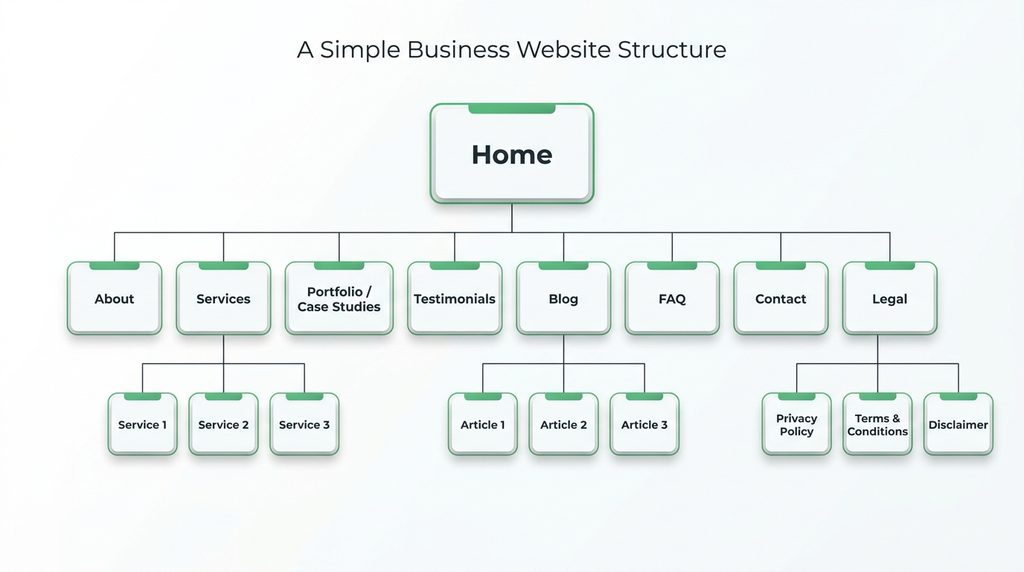
This structure is simple enough for visitors to understand while providing room for SEO and future growth.
How to Decide What Pages Your Website Needs
Before building your website, use this five-step process.
Step 1: Identify Your Business Goals
What should the website accomplish?
For example:
Generate leads
Sell products
Build credibility
Provide information
Receive applications
Showcase expertise
Step 2: Identify Your Audiences
Who will visit the website?
You might have:
- Customers
- Prospects
- Partners
- Investors
- Employees
- Job applicants
- Government stakeholders
- Media
Each audience may have different information needs.
Step 3: List Your Core Services or Products
Turn important services into logical website sections.
If a service is commercially important and requires explanation, consider giving it its own page.
Step 4: Identify Questions Visitors Ask
Your website should answer the questions people have before taking action.
For example:
- What do you offer?
- How much does it cost?
- Where are you located?
- Why should I trust you?
- How does the process work?
- How long does it take?
- Who have you worked with?
- How can I contact you?
These questions can inform both your pages and your content strategy.
Step 5: Map the Customer Journey
Think about the path a visitor might take.
For example:
Google Search → Blog Article → Service Page → Case Study → Contact → Enquiry
Or:
Social Media → Homepage → Services → Portfolio → WhatsApp
Your website should make these journeys easy.
Common Website Page Mistakes
Creating Too Many Pages
More pages don’t automatically make a website better.
Every page should have a clear purpose.
Putting Every Service on One Page
If important services have different audiences and search intent, individual service pages can provide a much better experience.
Ignoring Legal Pages
Privacy, terms, and other relevant legal information shouldn’t be forgotten.
No Dedicated Contact Page
Make it easy for visitors to reach you.
No Portfolio or Proof
If your business relies on demonstrating previous work, showcase it.
No Content Strategy
A blog should not exist simply because someone told you every website needs one.
Create content around questions your audience actually searches for.
Poor Internal Linking
Pages should connect logically.
A blog post about website design should be able to guide readers toward your Web Design service.
Designing Before Planning
Jumping directly into visual design without planning the website structure often creates unnecessary revisions later.
Business Website Page Checklist
Before launching your website, make sure you have considered:
Core Pages
- Home
- About
- Services or Products
- Contact
Trust & Conversion
- Portfolio / Projects
- Case Studies
- Testimonials
- FAQ
- Pricing, if appropriate
Content & SEO
- Blog / Resources
- Individual service pages
- Individual product pages where applicable
- Logical internal linking
- Search-friendly URLs
Organization-Specific
- Team / Leadership
- Careers
- News / Media
- Publications
- Downloads
Legal
- Privacy Policy
- Terms and Conditions
- Disclaimer where appropriate
Frequently Asked Questions
What pages should every business website have?
Most business websites should have at least Home, About, Services or Products, Contact, and relevant legal pages. Depending on the business, Portfolio, Testimonials, FAQ, Blog, Case Studies, and Pricing pages may also be valuable.
How many pages should a business website have?
There is no fixed number. A small business may need five to ten core pages, while a corporate organization or e-commerce business may require dozens or hundreds. The correct number depends on the business, audience, content, and functionality.
What are the most important pages on a business website?
The Homepage, About page, Services or Products pages, and Contact page are generally among the most important. For SEO and credibility, individual service pages, case studies, portfolio pages, and useful resources can also be highly valuable.
Does every service need its own website page?
No. Important services that have distinct audiences, search intent, or commercial value often benefit from dedicated pages. Minor or closely related services can sometimes be grouped together.
What pages should a small business website have?
A small business can start with Home, About, Services, Portfolio or Testimonials, FAQ, Contact, and relevant legal pages. A Blog can be added when the business has a clear content and SEO strategy.
What pages should an e-commerce website have?
An e-commerce website typically needs Home, Shop, Product Categories, Product Pages, Cart, Checkout, Customer Account, Shipping information, Returns/Refunds, FAQs, Contact, and relevant legal pages.
What pages should a portfolio website have?
A portfolio website can include Home, About, Services, Portfolio, Case Studies, Testimonials, Blog, and Contact. The exact structure depends on the professional’s industry and goals.
What pages help a website rank on Google?
There is no specific set of pages that automatically makes a website rank. However, useful service pages, product pages, educational content, location pages where genuinely relevant, and well-structured supporting content can create opportunities to rank for relevant searches.
Do I need a blog on my business website?
Not every business needs a blog. However, regularly publishing genuinely useful content can help businesses attract people searching for questions, problems, products, and services related to what they offer.
Should a business website have a pricing page?
It depends. A pricing page can help qualify prospects and improve transparency, but some businesses have highly customized pricing and may be better served by a “Request a Quote” or “Book a Consultation” approach.
What is the best website structure for SEO?
A strong SEO-friendly structure usually has clear navigation, logical categories, descriptive URLs, dedicated pages for important services or products, useful supporting content, and internal links connecting related pages.
Final Thoughts: Don’t Build Pages. Build a Website Structure.
A professional website isn’t simply a collection of pages.
It’s a connected system designed to guide visitors from discovery to understanding, trust, and action.
Your homepage introduces the business.
Your About page builds context and credibility.
Your service and product pages explain what you offer.
Your portfolio and case studies provide evidence.
Your blog attracts people searching for relevant information.
Your contact and conversion pages turn interest into action.
Your legal and organizational pages provide important supporting information.
The best website structure is therefore not the one with the most pages.
It’s the one where every important page has a purpose and every important piece of information is easy to find.
Before designing your next website, map the structure first.
Then design the experience around it.
Need Help Planning Your Business Website?
Penetralia Hub helps businesses, startups, professionals, corporate organizations, and institutions plan and build strategic digital experiences through Web Design, Web Development, and Consultancy.
Whether you’re launching a new business website, redesigning an outdated one, building an e-commerce platform, or developing a larger corporate website, we can help you determine what pages, structure, functionality, and digital strategy your organization actually needs.
Don’t just build a website. Build the right website for your business.