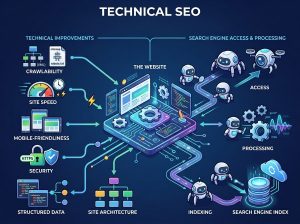
You launched your website, searched for your business on Google, and… nothing.
Your website doesn’t appear.
You search again using your business name. Still nothing.
You try another phrase. Your competitors appear, but your website doesn’t.
If this sounds familiar, you’re not alone.
One of the most frustrating experiences for a business owner is investing time and money into a website only to discover that potential customers can’t find it on Google.
But not showing on Google doesn’t always mean your website is broken.
There are several reasons a website may not appear in Google Search. Your site may not have been discovered yet, Google may not have indexed it, your pages may be blocked from crawling, your website may have technical problems, or your pages may simply not rank highly enough for the searches you’re making.
Google explains that crawling, indexing, and appearing prominently in search are separate processes. A page can therefore exist online without immediately appearing in search results. (Google for Developers)
Key Takeaways
- Your website can be online without being indexed by Google.
- Being indexed does not guarantee high search rankings.
- New websites may need time to be discovered and processed.
- Robots.txt and noindex settings can prevent pages from being properly crawled or indexed.
- Poor website structure can make important pages harder for search engines to discover.
- Duplicate or canonicalization problems can cause Google to select a different URL.
- Technical errors, redirects, and server problems can affect visibility.
- Low-quality or unhelpful content may struggle to perform in search.
- Google Search Console is one of the most useful tools for diagnosing indexing problems.
- Fixing visibility problems requires identifying the actual cause rather than simply adding more keywords.
Let’s look at the 10 most common reasons your website may not be showing on Google and what you can do about them.
First: What Does “Not Showing on Google” Actually Mean?
Before fixing the problem, it’s important to understand what you mean by “not showing.”
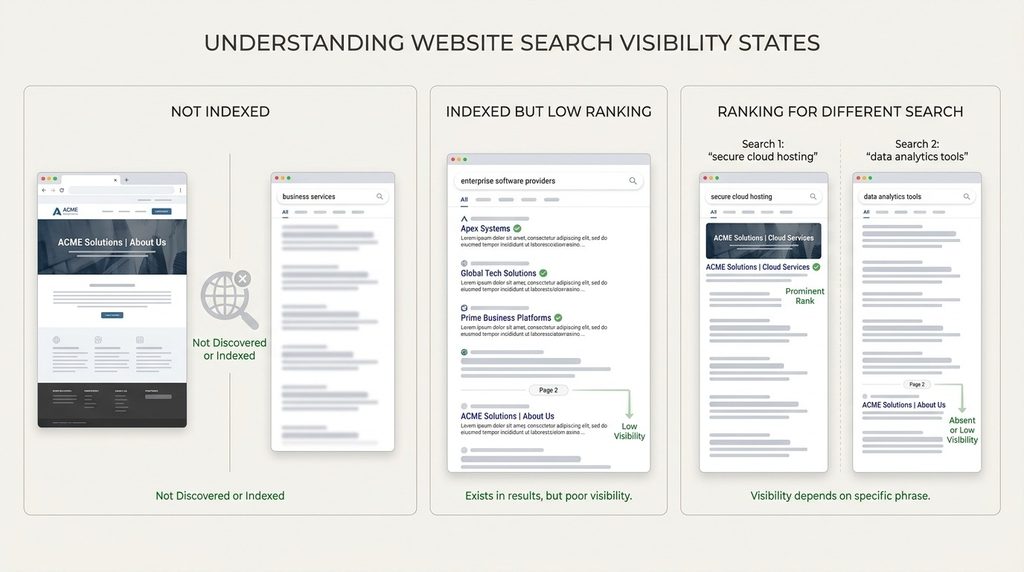
There are at least three different situations.
Situation 1: Your website is not indexed
Google hasn’t added the page to its searchable index.
In this case, searching for the exact URL or using Google’s site-search operator may not return the page.
Situation 2: Your website is indexed but doesn’t rank well
Google knows the page exists, but it may appear far down in search results.
For example, you might search:
“web design company in Abuja”
and your website may technically be indexed but appear several pages down.
That’s a ranking problem, not necessarily an indexing problem.
Situation 3: You’re searching for the wrong thing
Your website might rank for relevant searches but not for the exact phrase you’re typing.
For example, a business may rank for:
“website development company Abuja”
but not:
“best website designer in Nigeria”
Search visibility is therefore more complicated than simply asking whether your website appears when you search your business name.
1. Your Website Is Too New
If you’ve recently launched your website, Google may simply not have discovered and processed all of its pages yet.
Search engines need to:
- Discover your URLs.
- Crawl the pages.
- Understand their content.
- Decide whether and how to index them.
- Determine where they may appear in search results.
This process isn’t necessarily immediate.
Google notes that crawling and processing can take days to weeks depending on the circumstances. (Google for Developers)
What should you do?
If your website is new:
- Set up Google Search Console.
- Submit your sitemap.
- Make sure important pages are accessible.
- Add internal links between relevant pages.
- Publish useful content.
- Make sure there are no accidental indexing restrictions.
Don’t panic simply because a brand-new website isn’t ranking immediately.
SEO is generally a process rather than an instant switch.
2. Your Website Has a noindex Directive
One of the most important things to check is whether your pages are telling search engines:
“Don’t index this page.”
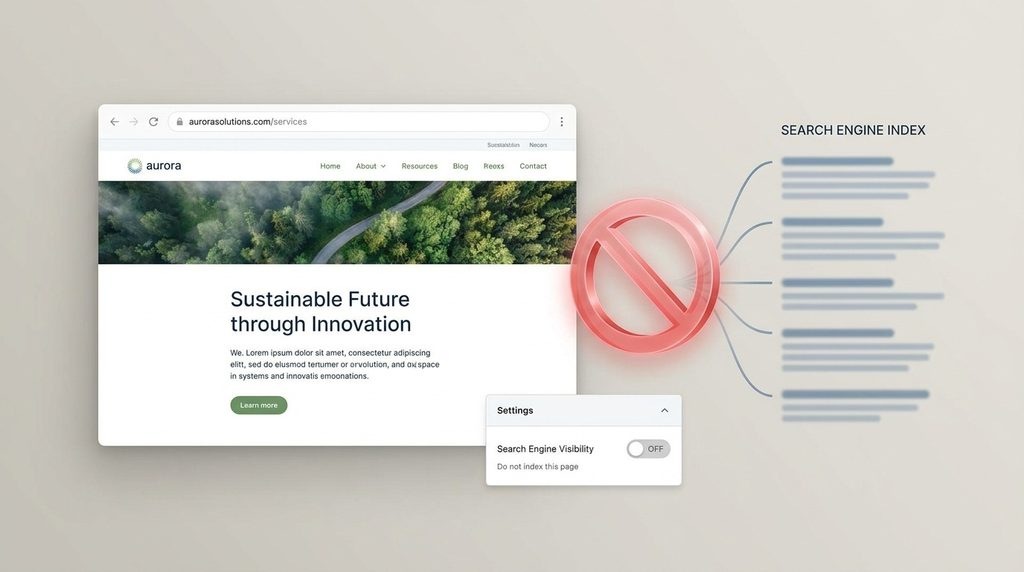
This can happen through a noindex robots meta tag or HTTP header.
How can this happen?
It is particularly common when:
- A website is still under development.
- A staging website is moved to production.
- An SEO plugin is configured incorrectly.
- Someone intentionally marked a page as noindex.
- A migration setting wasn’t removed.
A developer may have temporarily prevented search engines from indexing a website during development and accidentally left the setting active after launch.
WordPress example
Depending on your WordPress configuration, there may be a setting that discourages search engines from indexing the site.
If that setting is enabled accidentally, it can create serious visibility problems.
What should you do?
Check your website’s indexing settings and inspect important URLs using Google Search Console.
Don’t simply assume that because the website is publicly accessible, Google is allowed to index everything.
3. Your Robots.txt File Is Blocking Crawling
Another possible problem is your robots.txt file.
Robots.txt provides instructions to crawlers about which parts of a website they may access.
Google’s documentation explains that Googlebot reads robots.txt before crawling a site and follows applicable Disallow rules. (Google for Developers)
Example
A problematic rule could look like:
User-agent: *
Disallow: /
This essentially tells compliant crawlers not to crawl the site’s URLs.
A more specific rule could accidentally block an important section of your website.
Important distinction
Robots.txt controls crawling, while noindex controls indexing.
They are not the same thing.
Google also notes that a URL disallowed in robots.txt may still potentially be indexed as a URL even though Google cannot crawl its content. (Google for Developers)
What should you do?
Check your robots.txt file and make sure important pages and resources aren’t accidentally blocked.
If you’re unsure about the configuration, get a developer or SEO professional to review it.
4. Google Hasn’t Discovered Your Pages Yet
Your website may be accessible and technically healthy but still not have been discovered by Google.
This can happen when a website has very few links pointing to its pages.
Think about how Google discovers content
Google can discover URLs through various signals, including links and sitemaps.
If you launch a website with:
- No sitemap submitted
- Few internal links
- No external links
- Very little content
Google may have fewer ways to discover its pages.
Create a logical internal linking structure
For example:
Homepage → Services → Website Design → Business Website Development
Your pages should connect naturally.
Internal links help visitors navigate your website and help search engines discover relationships between pages.
Submit your sitemap
An XML sitemap gives search engines a structured list of URLs you want them to know about.
Google recommends submitting sitemaps through Search Console as part of managing a site’s discoverability and indexing. (Google for Developers)
5. Your Important Pages Are Not Properly Linked
Sometimes Google can find your website but struggles to understand its structure.
This can happen when important pages are effectively isolated.
Imagine your website has these pages:
- Home
- About
- Services
- Website Design
- Branding
- SEO
- Contact
But your website doesn’t link to the individual service pages anywhere.
Visitors may struggle to find them.
Search engines may also have less context about their importance within the site.
Build a logical site structure
A better structure might look like:
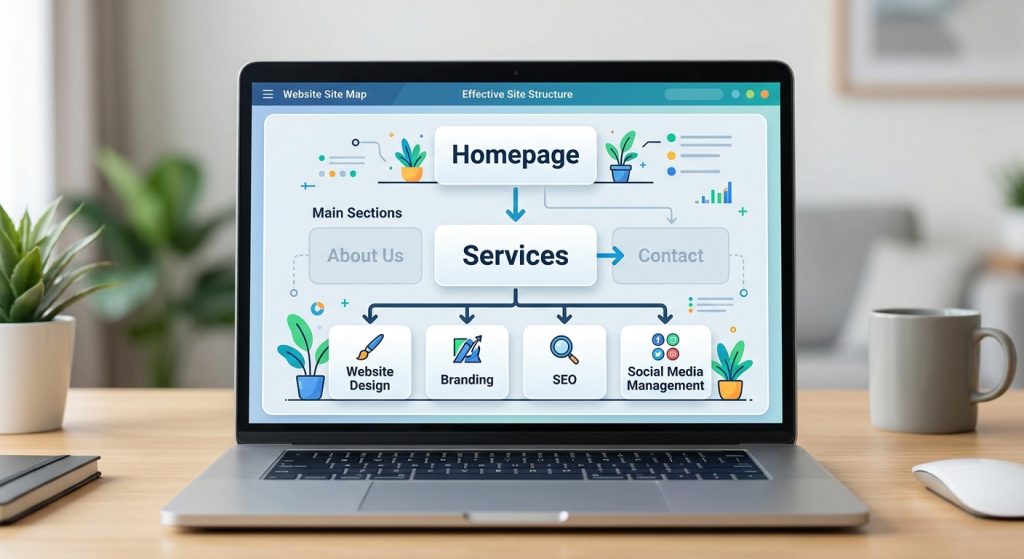
Each important page should be accessible through meaningful internal links.
6. Your Website Has Technical Errors
Technical problems can prevent Google from properly accessing or processing your website.
Examples include:
- Server errors
- DNS problems
- Broken pages
- Incorrect redirects
- Timeouts
- Hosting problems
- Incorrect HTTP status codes
- Plugin conflicts
- Broken website configurations
Google’s documentation specifically identifies server errors, redirects, robots.txt problems, and other technical issues as potential causes of crawling and indexing problems. (Google for Developers)
What is an HTTP error?
When a browser or crawler requests a URL, the server returns a status code.
For example:
200 — page successfully served
301 — permanent redirect
404 — page not found
500 — server error
If important pages consistently return errors, Google may be unable to properly process them.
Don’t ignore technical problems
A website can look perfectly fine to you while still having technical problems that affect search engine crawlers.
This is one reason technical SEO audits can be valuable.
7. Your Website Has Duplicate or Canonicalization Problems
Another less obvious reason your page may not appear as expected is canonicalization.
Imagine you have several URLs containing substantially similar content.
Google may determine that one URL is the preferred or canonical version.
Google explains that canonicalization is the process of selecting the representative URL from a group of duplicate or substantially similar pages. (Google for Developers)
Why does this matter?
Suppose you expect:
example.com/service-a
to appear in Google.
But your website accidentally signals another URL as canonical.
Google may choose the other URL as the representative version.
What can cause canonicalization problems?
Potential causes include:
- Incorrect canonical tags
- Duplicate pages
- Incorrect redirects
- Multiple versions of the same content
- Website migrations
- CMS configuration problems
Google also notes that a canonical declaration is a signal rather than an absolute command; Google can select a different canonical URL based on other signals. (Google for Developers)
What should you do?
Use Google Search Console’s URL Inspection tool to understand which URL Google considers canonical.
If the wrong URL has been selected, investigate the underlying technical and content signals.
8. Your Content Is Too Thin or Not Useful Enough
Technical accessibility isn’t the only factor.
Your website may be technically indexable but still struggle to appear prominently because its content doesn’t provide enough value.
For example, imagine a service page that says:
“We provide professional web design services. Contact us today for more information.”
That’s not enough information for a visitor—or for a search engine trying to understand the page.
A stronger service page might explain:
- What the service is
- Who it’s for
- What is included
- How the process works
- Problems it solves
- Benefits
- Frequently asked questions
- Examples of previous work
- Why your business is different
- What the next step is
Quality matters more than keyword stuffing
Adding the same keyword repeatedly isn’t an effective solution.
Google’s spam policies specifically warn against creating large amounts of low-value, unoriginal content primarily to manipulate search rankings. (Google for Developers)
Your priority should be:
Create content for people first, while making it easy for search engines to understand.
9. Your Website Is Indexed but Doesn’t Have Enough Authority to Rank
This is an important distinction.
Your website can be indexed and still receive almost no organic traffic.
Why?
Because indexing does not equal ranking.
Google has to determine which pages are most useful and relevant for a particular search.
If you’re competing against established websites with:
- Stronger content
- More relevant pages
- More industry recognition
- More useful resources
- More links and mentions
- Better topical coverage
your website may struggle to rank immediately.
What can you do?
Build your website’s search visibility gradually.
Focus on:
- Useful content
- Relevant keywords
- Strong internal linking
- Clear service pages
- Helpful blog content
- Local visibility where appropriate
- Genuine mentions and links
- Consistent publishing
This is where a long-term SEO strategy becomes more valuable than trying to find a quick trick.
10. Your Website Recently Moved or Changed
If your website has recently undergone a major change, your search visibility can temporarily be affected.
Examples include:
- Changing your domain
- Moving from HTTP to HTTPS
- Changing URL structures
- Redesigning the website
- Migrating platforms
- Merging websites
- Removing large numbers of pages
Google explains that significant site moves can cause temporary ranking fluctuations while Google recrawls and reprocesses URLs. (Google for Developers)
URL changes require careful planning
Suppose your old page was:
example.com/web-design
and the new page is:
example.com/website-design-services
If the old URL simply disappears without an appropriate redirect, users and search engines may encounter problems.
During a migration, businesses should carefully manage:
- URL mapping
- Redirects
- Canonical tags
- Internal links
- Sitemaps
- Search Console
- Removed pages
Don’t assume a redesign automatically preserves SEO
A visual redesign can be excellent for your brand and user experience while still damaging search visibility if technical SEO isn’t handled correctly.
How to Check Whether Your Website Is Indexed
One quick way to investigate is to search Google using:
site:yourdomain.com
For example:
site:example.com
This can give you an indication of whether Google has indexed pages from your domain.
However, don’t treat this as a complete SEO diagnostic tool.
For more reliable investigation, use Google Search Console.
Use Google Search Console to Diagnose the Problem
Google Search Console is one of the most useful tools available to website owners for understanding how Google interacts with their websites.
It can help you investigate:
- Indexing issues
- Search performance
- Search queries
- Clicks
- Impressions
- Sitemap submissions
- URL indexing
- Technical issues
Use the URL Inspection Tool
If a specific page isn’t appearing in Google, inspect that URL.
You can investigate whether Google:
- Can access the page
- Has indexed it
- Has selected another canonical URL
- Has encountered problems
If you’ve fixed a problem, Google provides a Request Indexing feature through URL Inspection for asking Google to recrawl a page. Google notes that this is subject to quotas and should be used selectively. (Google for Developers)
A Simple Website Visibility Checklist
If your website isn’t showing on Google, work through this checklist.
Step 1: Confirm the website is live
Can you open the website normally?
Step 2: Check whether Google knows about the site
Search:
site:yourdomain.com
Step 3: Set up Google Search Console
Make sure your website is verified.
Step 4: Submit your sitemap
Check that the sitemap is accessible and submitted.
Step 5: Inspect important URLs
Use URL Inspection for your homepage and key service pages.
Step 6: Check indexing settings
Make sure important pages aren’t marked noindex.
Step 7: Check robots.txt
Make sure important sections aren’t accidentally blocked.
Step 8: Check technical errors
Look for:
- 404 errors
- Server errors
- Redirect problems
- DNS issues
- Hosting problems
Step 9: Review your content
Ask:
Does this page genuinely answer the question or solve the problem behind the search?
Step 10: Be patient
If you’ve just launched a website or made significant changes, Google may need time to recrawl and process the site. (Google for Developers)
Why Your Website Not Showing on Google Doesn’t Always Mean Something Is Wrong
This is an important point.
Sometimes nothing is technically broken.
Your website may simply be:
- New
- Competing in a difficult search market
- Targeting the wrong keywords
- Lacking sufficient content
- Not yet established in search
- Ranking lower than you expected
For example, searching your business name and finding nothing could indicate an indexing or brand visibility issue.
But searching a highly competitive generic phrase and not finding yourself on page one does not necessarily mean your website isn’t indexed.
You need to distinguish between:
“Google doesn’t know my website exists.”
and
“Google knows my website exists, but it doesn’t rank where I want it to.”
Those are very different problems.
Should You Keep Adding Keywords?
Not necessarily.
When a website isn’t ranking, many business owners immediately start adding keywords everywhere.
That can be counterproductive.
SEO isn’t simply about repeating phrases.
Instead, investigate:
- Is the page indexable?
- Is Google able to crawl it?
- Is the page technically healthy?
- Is the content useful?
- Does it satisfy the search intent?
- Is the page targeting a realistic topic?
- Is the website internally well structured?
- Does the website have enough topical depth?
- Are there competing pages that better satisfy the search?
- Is the site still new and building visibility?
The right diagnosis should come before the solution.
When Should You Hire an SEO or Web Development Professional?
You may be able to solve simple indexing issues yourself.
However, professional help can be worthwhile when:
- Your entire website disappeared from Google
- A redesign caused traffic to drop
- You changed your domain
- Your pages aren’t being indexed
- Your website has technical errors
- You have complicated redirects
- You have thousands of pages
- Your site has duplicate-content issues
- You suspect a security compromise
- You don’t know how to interpret Search Console data
The important thing is to avoid making random changes without understanding the cause.
A technical problem can sometimes become worse when multiple SEO settings are changed at once.
Build a Website That Is Ready for Search
At Penetralia Hub, we don’t believe SEO should be something businesses think about only after their website is finished.
A strong website should be built with search visibility in mind from the beginning.
Our Website Design & Development approach considers the structure, content, usability, responsiveness, performance, and technical foundations that help create a stronger digital presence.
We can help businesses with:
- Business website design
- WordPress website development
- Website restructuring
- SEO-friendly website architecture
- Mobile-responsive development
- Service page structure
- Content organization
- Website performance improvements
- Technical website reviews
- Website redesigns and migrations
If your website exists but isn’t helping people discover your business, the answer may not be another redesign.
You may need to understand what is preventing the website from being discovered, indexed, understood, or ranked.
Is your website struggling to appear on Google?
Talk to Penetralia Hub about improving your website’s technical and search foundations.
Frequently Asked Questions
Why is my new website not showing on Google?
New websites may take time to be discovered, crawled, processed, and indexed. Make sure your website is accessible, your important pages are indexable, your sitemap is submitted, and your site is connected to Google Search Console.
How long does it take for Google to index a new website?
There is no guaranteed fixed timeframe. Google says crawling can take from several days to several weeks depending on the site and circumstances. (Google for Developers)
How do I know if Google has indexed my website?
You can search Google using site:yourdomain.com for a quick indication, but Google Search Console provides much more useful information about indexing and individual URLs.
Why is my website indexed but not ranking?
Being indexed doesn’t guarantee high rankings. Your website may face competition from more established or more relevant pages, or your content may not fully satisfy the search intent behind the queries you’re targeting.
Can robots.txt prevent my website from appearing on Google?
Robots.txt can prevent Google from crawling specified URLs. However, blocking crawling and preventing indexing are different concepts. Google may potentially know about a blocked URL even when it cannot crawl the page’s content. (Google for Developers)
What does “noindex” mean?
noindex is a directive telling search engines not to include a page in their search index. If an important business page is accidentally marked noindex, it can prevent that page from appearing in Google Search.
Should I request indexing for every page?
Not necessarily. Google recommends using the Request Indexing feature selectively because it is subject to quotas. Fix the underlying issue first, then request indexing for important URLs where appropriate. (Google for Developers)
Can redesigning my website affect Google rankings?
Yes. Changes to URLs, content, internal links, technical configuration, redirects, and site structure can affect search visibility. Major website migrations should therefore be carefully planned.
Why does my competitor appear on Google but my website doesn’t?
Your competitor may have stronger content, greater search relevance, a more established website, stronger local visibility, or other signals that help its pages perform better. Your website may still be capable of ranking, but it may require a more deliberate SEO strategy.
Does adding more keywords make my website rank higher?
Not automatically. Keyword repetition alone isn’t a reliable SEO strategy. Search engines increasingly focus on whether content is useful and relevant to users, and Google’s spam policies specifically discourage content created primarily to manipulate search rankings. (Google for Developers)
Final Thoughts
If your website isn’t showing on Google, don’t immediately assume that your website has failed.
First, determine what kind of visibility problem you’re actually experiencing.
Is Google unable to crawl your website?
Has it not indexed the page?
Is a noindex setting blocking it?
Is robots.txt preventing crawling?
Is there a technical error?
Has Google selected another canonical URL?
Or is the website simply indexed but not ranking strongly enough?
Once you identify the actual problem, the solution becomes much clearer.
Your website is the foundation of your digital presence—but being online is only the beginning.
To become discoverable, your website needs to be technically accessible, properly structured, useful to visitors, and strategically optimized for search.
And that is where good website development and SEO strategy work together.