
Every day, people search Google for businesses, products, services, answers and solutions.
Someone might search:
“web design company in Lagos”
Another person might search:
“how much does a business website cost?”
Or:
“best website design for a small business”
Within seconds, Google returns a list of webpages that it believes are most useful for that particular search.
But what actually happens between typing a search query and seeing those results?
Understanding how Google Search works is important for anyone who owns a website or wants to attract customers through SEO.
The process can be simplified into three major stages:
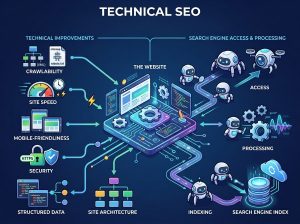
Crawling → Indexing → Ranking
Key Takeaway: Google discovers webpages through crawling, stores and understands their information through indexing, and then ranks relevant pages when someone performs a search. Your website needs to be discoverable, understandable and useful if you want it to compete in organic search.
What Is Google Search?
Google Search is a search engine that helps people find information available on the web.
When someone enters a query, Google doesn’t simply search the entire internet in real time and manually select websites.
Instead, Google has systems that continuously discover webpages, process their content and organize information so that relevant results can be returned quickly.
This involves several interconnected processes, including:
- Crawling
- Indexing
- Understanding search queries
- Ranking
- Serving search results
For website owners, crawling, indexing and ranking are particularly important.
At a simplified level, Google’s search process looks like this:
How Does Google Search Work?
Webpage → Crawling → Indexing → Search Query → Ranking → Search Results
Let’s break each stage down.
1. What Is Crawling?
Crawling is the process through which search engines discover webpages and follow links to find additional content.
Google uses automated systems called Googlebot to crawl publicly accessible webpages.
Imagine Google discovering your website for the first time.
It may find your homepage through a link from another website, a sitemap or other discovery mechanisms.
Googlebot visits the page and can discover links to:
- About
- Services
- Contact
- Blog
- Portfolio
- Individual service pages
It can then discover those pages as well.
This allows search engines to continuously discover new and updated content across the web.
What Is Googlebot?
Googlebot is Google’s web crawler.
You can think of it as an automated visitor that explores webpages so Google can discover and process their content.
Google actually uses different crawlers for different purposes, but the general concept is straightforward:
Googlebot discovers and crawls web content so Google’s systems can process it.
This does not mean every webpage is automatically indexed or ranked.
Crawling is only the beginning.
How Does Google Discover a New Website?
Google can discover webpages through several pathways.
For example:
Links
Google may discover your website through links from other webpages.
XML Sitemaps
A sitemap can provide search engines with information about URLs you want them to know about.
Previously Known URLs
Google may already know about a domain or URL and revisit it periodically.
Other Discovery Signals
Google has various systems for discovering publicly accessible content across the web.
This is why having a properly structured website and clear internal linking is important.
2. What Is Indexing?
After Google crawls a webpage, its systems can analyze and process the information found on that page.
This process is commonly referred to as indexing.
Think of Google’s index as an enormous organized library of information about webpages.
If Google discovers your webpage and determines that it is suitable for inclusion, information about the page can be stored in its index.
When someone searches for something later, Google can retrieve relevant pages from this index.
Is Every Website Indexed by Google?
No.
Being online does not guarantee that a webpage will appear in Google’s search results.
A page may fail to appear for various reasons.
For example:
- Google hasn’t discovered it yet.
- Google couldn’t crawl it properly.
- The page is blocked from crawling.
- The page has a noindex directive.
- The page has technical problems.
- Google considers another version more appropriate.
- The content may not provide enough value or relevance to appear.
This distinction is important:
Crawled does not necessarily mean indexed.
And:
Indexed does not guarantee high rankings.
3. What Does Google Analyze on a Webpage?
When Google’s systems process a webpage, they attempt to understand what the page is about and how it relates to potential searches.
This can involve signals from:
- Page content
- Headings
- Titles
- Links
- Images
- Structured data
- Website structure
- Language
- Context
- Other signals
For example, imagine a webpage titled:
“How to Choose the Right Website Design for Your Business”
If the page contains detailed information about:
- Business website design
- Website structure
- User experience
- SEO
- Branding
- Mobile responsiveness
Google has more context for understanding the subject of the page.
This is one reason clear, useful and well-structured content matters.
4. What Happens When Someone Searches Google?
Now let’s move from the website owner’s perspective to the searcher’s perspective.
Imagine someone searches:
“how to plan a business website”
Google has to determine what the person is actually looking for.
This is known as understanding search intent.
The user might want:
- A website planning checklist
- Advice before hiring a web designer
- Website page recommendations
- Information about website costs
- A website planning template
Google’s systems attempt to understand the query and return results that best satisfy the user’s needs.
What Is Search Intent?
Search intent is the reason behind a search query.
Consider these searches:
Informational
“What is WordPress?”
The person wants information.
Commercial Investigation
“WordPress vs website builders”
The person is comparing options.
Transactional
“Buy domain name”
The person is ready to take an action or make a purchase.
Navigational
“Penetralia Hub”
The person is looking for a specific website or brand.
Understanding search intent is extremely important when creating SEO content.
5. What Is Ranking?
After understanding the search query and identifying potentially relevant pages, Google needs to determine the order in which results should appear.
This is ranking.
Google uses many signals and systems to determine which results are most useful and relevant for a particular query.
The exact systems are complex and continually evolve.
However, website owners should focus on fundamental principles such as:
- Relevance
- Helpful content
- Quality
- User experience
- Website accessibility
- Page performance
- Authority
- Search intent
- Technical accessibility
Why Does One Website Rank Above Another?
Let’s say two websites have pages targeting:
“website design for small business”
Why might one rank above the other?
Google may evaluate numerous signals and factors relating to the pages and websites.
For example:
Website A
- Clearly addresses the topic
- Provides comprehensive information
- Has strong internal linking
- Has useful supporting content
- Provides a good user experience
- Has relevant authority
Website B
- Contains a short generic article
- Doesn’t answer the searcher’s questions
- Has poor structure
- Loads slowly
- Has little supporting content
Even though both pages discuss website design, they may not provide the same level of value or relevance.
Does Google Rank Websites or Webpages?
This is an important distinction.
Google generally returns webpages in response to searches, not simply entire websites.
For example, your website might contain:
- Homepage
- Web Design page
- Web Development page
- SEO page
- Blog
- Contact page
A search for:
“web development services”
might lead someone directly to your Web Development service page.
A search for:
“how much does a website cost?”
might lead to one of your blog articles.
This is why every important page should have a clear purpose.
How Keywords Fit Into Google Search
Keywords are words and phrases people use when searching.
For example:
“website design company”
“WordPress web design”
“business website cost”
“ecommerce website development”
“SEO services for small business”
Keyword research helps businesses understand what their target audience is searching for.
But modern SEO isn’t simply about inserting a keyword repeatedly into an article.
Google needs to understand the meaning and context of content.
For example, an article about:
“How to Build a Business Website”
may naturally discuss:
- Domain
- Hosting
- Web design
- WordPress
- Website pages
- SEO
- Mobile responsiveness
- Contact forms
- Website security
These related concepts help establish what the content is actually about.
What Is the Difference Between Keywords and Search Intent?
Keywords describe what someone searches.
Search intent describes why they searched it.
For example:
Keyword: “website cost”
Possible intent:
“I am trying to determine how much I should budget for a website.”
Your content should address that underlying need rather than simply repeating the phrase “website cost.”
How Google Determines Relevance
Google wants to return results that are relevant to the searcher’s query.
Relevance can be influenced by things such as:
- The words and concepts on the page
- The meaning of the content
- The search query
- The user’s location when relevant
- The freshness of information when freshness matters
- The type of content
- Other contextual signals
For example, someone searching:
“web design company Lagos”
may expect results relevant to businesses serving Lagos.
Someone searching:
“how does WordPress work?”
is looking for educational information rather than a local service provider.
The same website could potentially target both types of searches with different pages and content.
Does Website Location Matter for Google Search?
For some searches, yes.
Local searches can have a strong geographic component.
For example:
“web design company near me”
“website developer Lagos”
“digital marketing agency Lagos”
Google can use location-related signals to provide locally relevant results.
For businesses serving specific locations, local SEO can therefore be an important part of their strategy.
How Links Help Google Discover Content
Links are important to how search engines discover and understand webpages.
There are two major types worth understanding.
Internal Links
Internal links connect pages on your own website.
For example:
Blog Article → Web Design Service Page
Or:
WordPress Guide → Website Development Service
Internal linking can help users discover related information and help search engines understand the relationships between pages.
External Links
External links point from one website to another.
For example:
Industry Website → Penetralia Hub
When relevant and earned naturally, links from other reputable websites can contribute to a website’s authority and visibility.
However, SEO is not simply about collecting as many links as possible.
Quality and relevance matter.
What Is an XML Sitemap?
An XML sitemap is a file that provides information about URLs on a website that you want search engines to discover.
For example, it may contain URLs for:
- Important pages
- Service pages
- Blog posts
- Product pages
A sitemap can help search engines discover your site’s important URLs, particularly on larger or more complex websites.
However, submitting a sitemap does not guarantee indexing or ranking.
What Is Robots.txt?
A robots.txt file provides instructions to crawlers about which areas of a website they should or should not crawl.
It can be useful for managing crawler access.
However, it is important to understand that robots.txt is primarily a crawling instruction mechanism.
It should not be treated as a universal method for keeping sensitive information private.
What Is the Difference Between Crawling, Indexing and Ranking?
This is one of the most important concepts to understand.
Crawling
Google discovers and accesses a webpage.
Indexing
Google processes and stores information about the webpage.
Ranking
Google determines where a relevant webpage may appear for a particular search.
Think of it like a library:
Crawling: Finding a new book.
Indexing: Cataloguing the book.
Ranking: Deciding which books are most useful to show when someone asks a question.
Why Your Website May Not Appear on Google
If your website isn’t appearing in search results, don’t immediately assume that your SEO is failing.
First determine what stage of the process may be causing the problem.
Problem 1: Google Hasn’t Discovered the Page
The page may be new or poorly connected to the rest of the website.
Problem 2: Google Can’t Crawl the Page
Technical configuration may be preventing access.
Problem 3: The Page Isn’t Indexed
Google may have crawled it but decided not to include it in the index.
Problem 4: The Page Is Indexed but Doesn’t Rank Well
This is an SEO and relevance problem rather than an indexing problem.
These are very different situations.
How to Check If Google Has Indexed Your Website
One simple way to investigate is to search Google using:
site:yourdomain.com
For example:
site:penetraliahub.com
This can show pages from your website that Google has indexed.
However, the results are not a complete diagnostic tool.
For more detailed information, website owners can use Google Search Console.
Search Console can provide information about:
- Search performance
- Search queries
- Indexed pages
- Indexing issues
- Technical problems
- Search visibility
- Sitemap status
How to Help Google Understand Your Website
If you want your website to perform well in organic search, start with the fundamentals.
1. Create Clear Website Architecture
Organize your website logically.
For example:
Home → Services → Web Design → Web Design for Small Business
This creates a clear relationship between topics.
2. Create Useful Content
Don’t create articles simply because you want to target keywords.
Create content that genuinely answers questions your audience has.
For example:
Instead of writing:
“Web Design Web Design Web Design”
Create:
“How to Choose the Right Website Design for Your Business”
and actually explain how business owners should make the decision.
3. Target Search Intent
Before writing an article, ask:
What does someone searching this phrase actually want?
Then create content that satisfies that need.
4. Use Clear Headings
Use headings to organize your content.
For example:
H1: How Does Google Search Work?
H2: What Is Crawling?
H2: What Is Indexing?
H2: What Is Ranking?
H2: Why Doesn’t My Website Appear on Google?
This helps readers navigate the article and gives search engines clearer context.
5. Build Internal Links
Connect related articles and service pages.
For example:
How Google Search Works
↓
What Is SEO?
↓
How to Improve Website SEO
↓
SEO Services
This creates a connected content ecosystem.
6. Make Your Website Mobile-Friendly
Your website should work properly across smartphones, tablets and desktops.
This includes:
- Navigation
- Typography
- Buttons
- Forms
- Images
- Tables
- Page layouts
7. Improve Website Performance
A slow website can create a poor user experience.
Pay attention to:
- Image sizes
- Hosting
- Caching
- Code
- Plugins
- Page structure
- Third-party scripts
Performance should be considered as part of the overall website strategy.
8. Keep Important Content Accessible
Make sure important pages can be discovered through your website’s navigation and internal links.
A valuable page buried with no internal connections may be harder for both users and search engines to discover.
How Google Search Relates to Your Business Website
Understanding Google Search becomes particularly valuable when you’re building a business website.
Your website shouldn’t simply be:
Home → About → Services → Contact
It should be designed around how potential customers discover and evaluate your business.
For example:
Google Search
↓
Educational Blog Article
↓
Related Service Page
↓
Case Study / Portfolio
↓
Contact / Quote Request
This creates a pathway from search visibility to business conversion.
SEO Is More Than Getting on Google
One of the biggest misconceptions about SEO is that the goal is simply:
“Get my website on Google.”
Being indexed is only the beginning.
The real objective is to attract the right people and help them take meaningful action.
For a web design company, ranking for:
“What is a website?”
may bring traffic.
But ranking for:
“web design company for small business”
may attract visitors much closer to becoming customers.
This is why SEO strategy should consider both traffic and commercial intent.
How Educational Content Supports Business Growth
A strong SEO content strategy can guide people through different stages of the buying journey.
Awareness
What is website design?
Education
How does Google Search work?
Consideration
WordPress vs website builders: Which is better?
Commercial Investigation
How much does a website cost?
Decision
Web design services
Your blog can therefore become more than a source of traffic.
It can become part of your customer acquisition system.
Frequently Asked Questions
How does Google Search work in simple terms?
Google discovers webpages through crawling, processes and stores information through indexing, and uses ranking systems to determine which relevant pages to show for a search query.
What are the three main stages of Google Search?
The three commonly explained stages are crawling, indexing and serving/ranking search results.
What is crawling in SEO?
Crawling is the process through which search engine crawlers discover and access webpages and follow links to find additional content.
What is indexing in SEO?
Indexing is the process of processing and storing information about webpages so that Google can potentially return them in search results.
What is ranking in Google?
Ranking refers to determining the order in which relevant search results are presented for a particular query.
Does Google index every website?
No. Being published online does not guarantee that a webpage will be crawled, indexed or shown prominently in search results.
How long does Google take to index a new website?
There is no fixed timeframe. It can vary depending on the website, URL discovery, crawlability, content and other factors.
Why isn’t my website showing on Google?
Possible reasons include Google not discovering the site, crawling problems, indexing issues, technical configuration, insufficient relevance or simply low rankings for the searches you’re targeting.
Does having keywords help my website rank?
Keywords help you understand what people search for and can help you create relevant content. However, modern SEO is about satisfying search intent and providing useful, relevant information rather than repeatedly inserting keywords.
Does website design affect SEO?
Yes. Website structure, navigation, mobile usability, page performance, accessibility, content organization and technical implementation can all affect the overall search experience and SEO.
Can a new business website rank on Google?
Yes. New websites can appear in Google Search, but building meaningful organic visibility usually requires technically accessible pages, useful content, relevant targeting, authority and consistent SEO work.
Final Thoughts
Google Search can seem complicated because billions of webpages are competing for visibility.
But the basic process is easier to understand when you break it down:
Crawling → Indexing → Understanding → Ranking → Search Results
For businesses, the lesson is simple.
Don’t build a website only for humans to look at.
Build a website that is:
- Useful to your audience
- Easy to navigate
- Technically accessible
- Structured clearly
- Relevant to search intent
- Optimized for mobile
- Fast and secure
- Connected through internal links
- Supported by valuable content
Most importantly, don’t think about SEO as something you add after the website is finished.
SEO should influence how you plan the website from the beginning.
Want to Build a Website That Can Be Found on Google?
At Penetralia Hub, we approach website development from both the business and search perspective.
Our Web Design, Web Development and Consultancy services help businesses, startups, professionals, corporate organizations and institutions build websites that are designed around their goals, audiences and long-term digital growth.
From website architecture and user experience to SEO-ready content structures and technical development, the goal is to create a website that doesn’t simply exist online—but can become a valuable part of your customer acquisition strategy.
Build the website. Structure it for search. Create content that answers real questions. Turn visibility into business growth.