
A business website can look professional and still fail to generate results.
You may have a beautiful homepage, a list of services and a contact form, yet visitors still leave without contacting you.
The problem isn’t always the quality of your business.
Often, it’s the way the website is designed, structured or presented.
Common problems such as unclear messaging, poor navigation, slow loading times, weak calls to action and poor mobile experiences can make it difficult for visitors to understand what you offer or take the next step.
Key Takeaway: A successful business website isn’t just about looking good. It needs to communicate clearly, work smoothly, build trust, help visitors find information quickly and make it easy for potential customers to take action.
In this guide, we’ll examine 10 common business website mistakes, explain why they hurt your business and show you how to fix them.
1. Your Website Doesn’t Clearly Explain What Your Business Does
One of the biggest mistakes businesses make is making visitors work too hard to understand what they offer.
When someone lands on your homepage, they should quickly understand:
- Who you are
- What you offer
- Who you serve
- What problem you solve
- What they should do next
If your homepage says:
“Welcome to the future of excellence.”
That’s attractive branding, but it doesn’t tell the visitor much.
Compare that with:
“Professional Web Design and Development for Growing Businesses.”
The second statement immediately communicates the service.
How to Fix It
Make your homepage headline specific.
A simple formula is:
What you do + Who you serve + Value you provide
For example:
“Custom Web Design for Businesses Ready to Grow Online.”
Your supporting text can then explain the service in more detail.
2. Your Website Is Designed Around Your Business Instead of Your Customers
Your website isn’t primarily for you.
It’s for the people you’re trying to reach.
Businesses often fill their websites with information they want visitors to know without considering what visitors actually need.
For example, a company might dedicate most of its homepage to its history while barely explaining:
- Services
- Benefits
- Pricing
- Process
- Results
- Contact options
How to Fix It
Start with your audience.
Ask:
Who is visiting this page?
What are they looking for?
What problem are they trying to solve?
What information would help them make a decision?
Then structure your website around those needs.
3. Your Website Has Poor Navigation
Visitors shouldn’t have to hunt for basic information.
If users can’t quickly find your services, contact information or important pages, they’re more likely to leave.
Poor navigation can include:
- Too many menu items
- Confusing labels
- Hidden important pages
- Inconsistent navigation
- Overly complicated dropdown menus
How to Fix It
Keep your main navigation simple.
For many business websites, a structure such as:
Home | About | Services | Portfolio | Blog | Contact
is a good starting point.
You can then organize more detailed pages underneath major categories.
The goal isn’t to minimize the number of pages.
The goal is to make the website easy to understand and navigate.
4. Your Website Is Not Mobile-Friendly
A website that looks excellent on a desktop can still provide a poor experience on a smartphone.

Visitors may encounter:
- Tiny text
- Buttons that are difficult to tap
- Images extending beyond the screen
- Broken layouts
- Horizontal scrolling
- Menus that don’t work properly
- Forms that are difficult to complete
This is especially important for businesses because many potential customers discover businesses through mobile devices.
How to Fix It
Test your website on multiple screen sizes.
Pay attention to:
- Font sizes
- Button sizes
- Navigation
- Images
- Forms
- Spacing
- Page sections
- Popups
Don’t simply ask:
“Does the website look good on mobile?”
Ask:
“Can someone comfortably use this website on mobile?”
Those are two different questions.
5. Your Website Loads Too Slowly
A beautiful website isn’t useful if visitors leave before it finishes loading.

Large images, excessive animations, poorly optimized plugins, inefficient code and slow hosting can all contribute to performance problems.
How to Fix It
Start with the basics:
- Compress images
- Use appropriate image formats
- Reduce unnecessary plugins
- Minimize heavy animations
- Optimize fonts
- Use caching
- Keep themes and plugins updated
- Choose appropriate hosting
- Remove unnecessary scripts
Website performance should be considered during development rather than treated as an afterthought.
6. Your Website Doesn’t Have Clear Calls to Action
A visitor may like your website but still have no idea what to do next.

This happens when websites don’t clearly guide users toward an action.
For example, a service page might explain everything about a service but end without saying:
What should the visitor do now?
How to Fix It
Give important pages a clear next step.
Depending on your business, this could be:
- Request a Quote
- Book a Consultation
- Contact Us
- Start a Project
- Get a Proposal
- Shop Now
- Schedule a Call
- Download the Guide
Your CTA should match the visitor’s stage in the buying journey.
Someone reading an educational article may not be ready to buy.
A visitor on your service page may be much closer to taking action.
7. Your Website Doesn’t Build Enough Trust
People are naturally cautious when dealing with businesses online.
Before contacting you, they may want evidence that your business is legitimate and capable.
A website without trust signals can make visitors hesitate.
Useful Trust Signals
Depending on your business, these can include:
- Client testimonials
- Case studies
- Portfolio
- Certifications
- Professional affiliations
- Reviews
- Team information
- Business location
- Contact information
- Privacy policy
- Terms and conditions
- Guarantees where appropriate
How to Fix It
Don’t simply tell visitors:
“We are the best.”
Show them why they should trust you.
For example:
Claim: We build professional websites.
Evidence: Show actual projects, explain your process and provide client results or testimonials where available.
8. Your Website Has Weak or Generic Content
A website can have excellent design and still fail because the content says very little.
Examples include:
“We provide innovative solutions for your business.”
“We are committed to excellence.”
“Your success is our priority.”
These statements aren’t necessarily wrong.
They’re simply too generic.
How to Fix It
Make your content specific.
Instead of:
“We provide innovative digital solutions.”
try:
“We design and develop WordPress websites that help businesses establish credibility, attract search traffic and generate enquiries.”
Specific content gives visitors a clearer understanding of your value.
9. Your Website Isn’t Optimized for Search Engines
A website can look excellent and still receive very little organic traffic.
SEO needs to be considered during website planning and development.
Common problems include:
- Poor page titles
- Missing or weak headings
- Poor URL structures
- No internal linking
- Thin service pages
- No useful supporting content
- Poor keyword targeting
- Duplicate content
- Technical indexing problems
How to Fix It
Start with the fundamentals.
Each important page should have:
- A clear search-focused topic
- A descriptive title
- A useful H1 heading
- Well-organized sections
- Relevant keywords and concepts
- Internal links
- Helpful content
- A clear purpose
For example, instead of creating one generic page called:
Services
you could create dedicated pages such as:
Web Design Services
Web Development Services
SEO Services
Social Media Management
This gives each service a clearer purpose and search opportunity.
10. Your Website Doesn’t Make Conversion Easy
Getting visitors is only part of the job.
You also need to make it easy for interested visitors to become leads or customers.
Imagine someone wants to hire you.
They have to:
- Find your contact page.
- Search for your phone number.
- Fill out a complicated form.
- Wait several days for a response.
That’s unnecessary friction.
How to Fix It
Make the conversion process simple.
Depending on your business, you could provide:
- Clear contact buttons
- WhatsApp integration
- Short enquiry forms
- Click-to-call buttons
- Booking systems
- Quote request forms
- Email contact
- Clear service-specific CTAs
The fewer unnecessary obstacles between interest and action, the better.
Bonus: Your Website Doesn’t Have a Clear Business Goal
This is the mistake behind many of the others.
Before designing a website, businesses sometimes ask:
“What should our website look like?”
A better question is:
“What should our website help the business achieve?”
Your goal might be to:
- Generate leads
- Sell products
- Receive enquiries
- Build credibility
- Showcase a portfolio
- Educate customers
- Book appointments
- Receive applications
- Generate phone calls
The goal influences the design, content, functionality and structure.
How to Audit Your Business Website
You can use this simple checklist to identify potential problems.
| Area | Question |
| Messaging | Can visitors understand what we do immediately? |
| Audience | Is the website written for our customers? |
| Navigation | Can visitors find important information quickly? |
| Mobile | Does everything work properly on smartphones? |
| Speed | Does the website load efficiently? |
| Content | Does each page provide useful information? |
| Trust | Do we provide enough evidence of credibility? |
| SEO | Can search engines understand our important pages? |
| Conversion | Is it obvious what visitors should do next? |
| Business Goal | Does the website support a measurable business objective? |
If you answer no to several of these questions, your website probably needs improvement.
How to Prioritize Website Improvements
You don’t necessarily need to redesign your entire website immediately.
Start with the problems that have the greatest potential business impact.
Priority 1: Fix Critical Problems
Address:
- Broken pages
- Broken forms
- Mobile usability issues
- Security problems
- Major performance problems
- Indexing problems
Priority 2: Improve Communication
Fix:
- Weak headlines
- Unclear service descriptions
- Confusing navigation
- Poor page structure
Priority 3: Improve Conversion
Add or improve:
- Calls to action
- Contact options
- Lead forms
- Testimonials
- Portfolio
- Case studies
Priority 4: Build Search Visibility
Then work on:
- Keyword research
- On-page SEO
- Internal linking
- Content strategy
- Local SEO
- Technical SEO
This approach prevents businesses from spending money redesigning things that aren’t actually the biggest problem.
How Professional Web Design Prevents These Problems
Professional web design isn’t simply about choosing attractive colors and arranging sections on a page.
A properly planned business website considers:
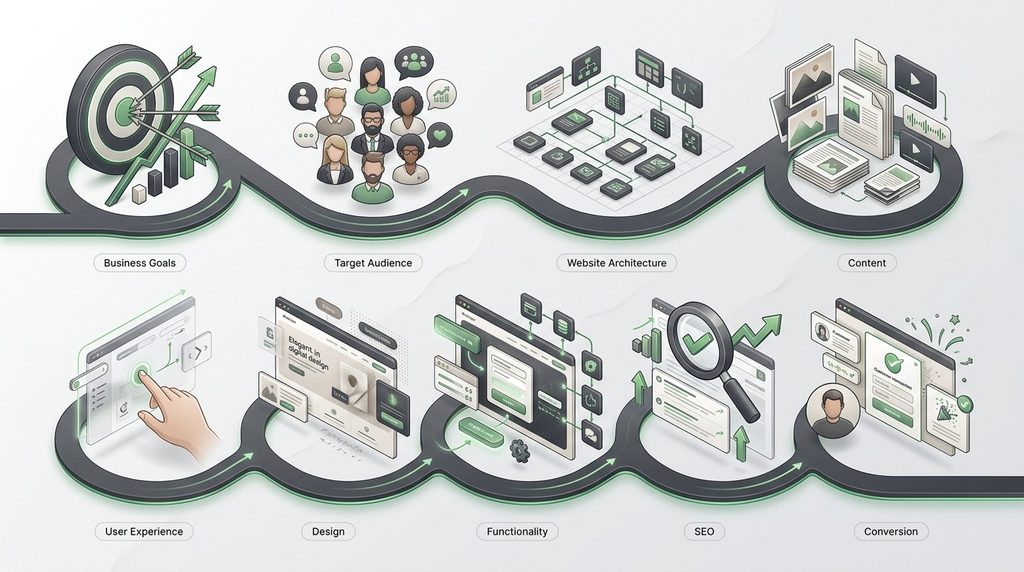
This is why website planning should happen before the visual design process.
A website that looks impressive but doesn’t support the business objective is still an ineffective website.
Frequently Asked Questions
What are the most common business website mistakes?
Common mistakes include unclear messaging, poor navigation, lack of mobile optimization, slow loading speeds, weak calls to action, poor content, insufficient trust signals, weak SEO and complicated conversion processes.
Why is my business website not getting customers?
Your website may not be converting visitors because your messaging is unclear, your offer isn’t communicated effectively, visitors don’t trust the business, the website is difficult to use or there is no clear path toward contacting or purchasing from you.
What makes a business website ineffective?
An ineffective business website often fails to connect its design, content, functionality and SEO strategy to a specific business goal.
How can I improve my business website?
Start by reviewing your website’s messaging, navigation, mobile experience, performance, content, trust signals, SEO and calls to action. Prioritize problems that directly affect usability and conversions.
How important is mobile-friendly web design?
Very important. Your website should provide a usable experience across smartphones, tablets and desktops. Mobile usability should be considered from the beginning of the design and development process.
Does website speed affect SEO?
Website performance is one part of the broader page experience and technical quality of a website. Improving speed can also improve usability, particularly for visitors on slower connections or mobile devices.
How many calls to action should a website have?
There is no universal number. The important thing is that relevant pages provide a clear next step without overwhelming visitors with competing actions.
Should every business have a blog?
Not necessarily. A blog can be valuable for businesses that have useful questions to answer, topics to explain or search opportunities to target. However, publishing content simply to have a blog isn’t enough; the content should support your audience and business goals.
Can I fix my website without redesigning it?
Yes. Many problems can be addressed without rebuilding the entire website. Improving content, navigation, calls to action, performance, mobile usability or SEO may produce meaningful improvements.
When should a business redesign its website?
Consider a redesign when the existing website has significant usability, technical, branding, performance or conversion problems that cannot be effectively addressed through smaller improvements.
Final Thoughts
Your website doesn’t need to be perfect to be effective.
But it needs to do the fundamentals well.
Visitors should quickly understand who you are, what you offer, why they should trust you and what they should do next.
Search engines should also be able to crawl, understand and discover your important content.
If your website is attractive but confusing, fast but unconvincing, or informative but impossible to navigate, it isn’t doing its full job.
The strongest business websites bring several disciplines together:
Good design + clear content + usability + SEO + functionality + conversion strategy.
That is what turns a website from a digital brochure into a genuine business growth tool.
Build a Website That Works for Your Business
At Penetralia Hub, we don’t approach web design as simply putting attractive sections on a screen.
Our Web Design, Web Development and Consultancy services focus on building websites around business objectives, audience needs, usability, functionality and long-term digital growth.
Whether you’re launching a new business website or trying to improve an existing one, the right approach starts by identifying what the website needs to accomplish—then designing and developing around that goal.
Your website should do more than exist online. It should work for your business.